 NEWS
NEWS
iPhone 18 Pro's Special Color Rumored Yet Again
 04/23/2026
 2141
2141
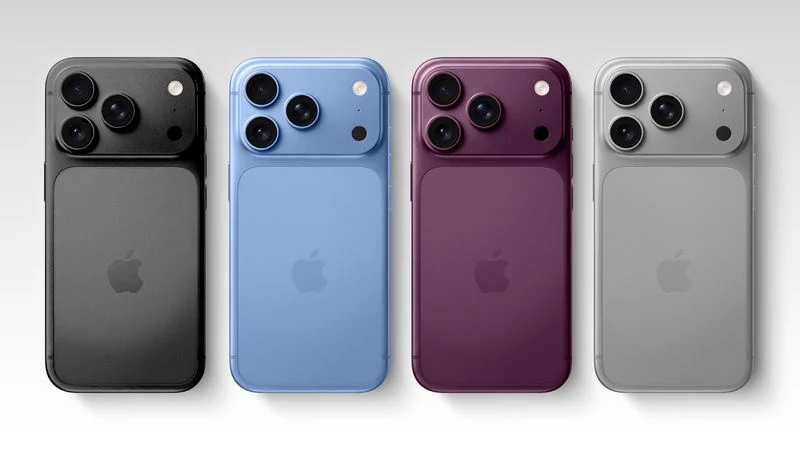
Last week, Macworld's Filipe Espósito reported that Apple is testing four color options for the iPhone 18 Pro and iPhone 18 Pro Max, and one of those colors has since been corroborated by a known leaker on the Chinese social media platform Weibo.
Dark Cherry would be the signature new color option for the iPhone 18 Pro models this year, following Cosmic Orange for the iPhone 17 Pro models. This might end up being the "deep red" that was previously rumored for the devices.
Weibo leaker "Instant Digital" today corroborated the Dark Cherry color option, describing it as a mix of burgundy, coffee, and deep purple. Those were all previously-rumored iPhone 18 Pro color options, but it appears that they are actually one in the same.
"Instant Digital" has accurately leaked Apple information before, such as the yellow color for the iPhone 14 and iPhone 14 Plus.
Light Blue looks similar to the iPhone 13 Pro's Sierra Blue color option.
Depending on the shade, Dark Gray could be similar to either the iPhone 13 Pro's Graphite color option or the iPhone 14 Pro's Space Black finish.
Silver would remain an option too — it is Apple's classic color.
iPhone 17 Pro models are available in Cosmic Orange, Deep Blue, and Silver. Macworld said Cosmic Orange and Deep Blue will likely be discontinued, so do not expect either of those color options to remain available for the iPhone 18 Pro models.
Last year, Macworld accurately leaked the iPhone 17 Pro's Cosmic Orange and Deep Blue colors, but the report also mentioned black, white, and gray color options that did not materialize. So, at least some of the rumored iPhone 18 Pro colors will likely prove to be true, but it remains to be seen if Apple moves forward with all four.
Apple is expected to unveil the iPhone 18 Pro models in September.
Source: Macrumors










