
NEWS

New MacBook Neo With A19 Pro Chip and 12GB RAM Expected Next Year

04/08/2026

19

Apple is planning to release a new MacBook Neo next year, according to Taiwan-based tech columnist and former Bloomberg reporter Tim Culpan.
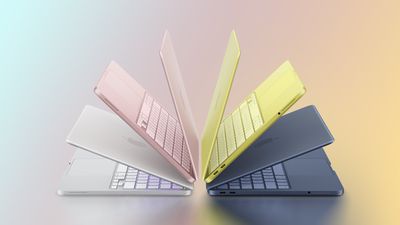
New MacBook Neo With A19 Pro Chip and 12GB RAM Expected Next Year
In the latest edition of his Culpium newsletter today, Culpan said the new MacBook Neo will be equipped with a version of the A19 Pro chip from the iPhone 17 Pro models. This means the next edition of the laptop should have an increased 12GB of RAM, as that is how much unified memory the chip has in the iPhone 17 Pro models.

The current MacBook Neo has an A18 Pro chip and 8GB of RAM.

In the iPhone 17 Pro models, the A19 Pro has a 6-core GPU, but Culpan expects Apple to use a "binned" version of the chip with a 5-core GPU in the next MacBook Neo. The current model also has a 5-core GPU, so this would not be a change.

It was already widely assumed that the MacBook Neo would eventually get the A19 Pro, but Culpan's information from his supply chain sources in Asia turns it into an official rumor and provides a launch timeframe of next year. Apple unveiled the current MacBook Neo in early March this year, and it appears to be a hit so far.

According to a separate DigiTimes report today, the MacBook Neo is assembled in China and Vietnam. Culpan said Apple is in talks with suppliers to potentially boost MacBook Neo production given that sales have apparently surpassed expectations, but he noted that the company is facing a "massive dilemma" as a result.

Source: Macrumors

Windows
Mac OS
iOS
Linux
3uTools
Win 64-bit For this device
V9.05 2026-03-28
Download
Win 32-bit For this device
V9.05 2026-03-28
Download
3uTools
Intel Chip How to Identify Chip Type
V9.03 2026-03-27
Download
Apple Silicon
V9.03 2026-03-27
Download
How to Identify Chip Type
1.  Click the Apple icon in the top-left corner of the screen and select About This Mac.
2.  Check the Processor or Chip field to determine if it is "Intel" or "Apple".
Please use the 3uTools PC client to install the iOS client:
1、 Install either the Windows or Mac version of 3uTools on your computer
2、 Open the PC client and connect your device to the computer via USB cable
3、 After the connection is successful, wait for the computer to automatically install the mobile app for the device, or locate “Install Mobile App” on the computer and manually click to install.
3uTools
deb file
V3.01 2025-11-20
Download
rpm file
V3.01 2025-11-20
Download
Windows
Windows
iOS
iOS
Android
Android
TV
TV
3uAirPlayer
Win 64-bit For this device
V6.0.3 2026-03-11
Download
Win 32-bit For this device
V6.0.3 2026-03-11
Download
iOS Device Mirroring (No App Required)
1、 Install 3uAirPlayer on the Windows PC
2、 Open Control Center and select Screen Mirroring
3、 From the list, choose your PC to start mirroring
4、 Or connect your iOS device to the PC via USB to begin mirroring
Scan to get "3uAirPlayer" App
3uAirPlayer TV V1.0.18
2025-11-28
TV System Requirements: Android 7.0 or later
Download the TV installation package, copy it to a USB drive, insert it into your TV or set-top box, then select the file from the home screen to install.




