 NEWS
NEWS
Beats Teams Up With Nike for Special-Edition Powerbeats Pro 2
 03/18/2026
 1621
1621
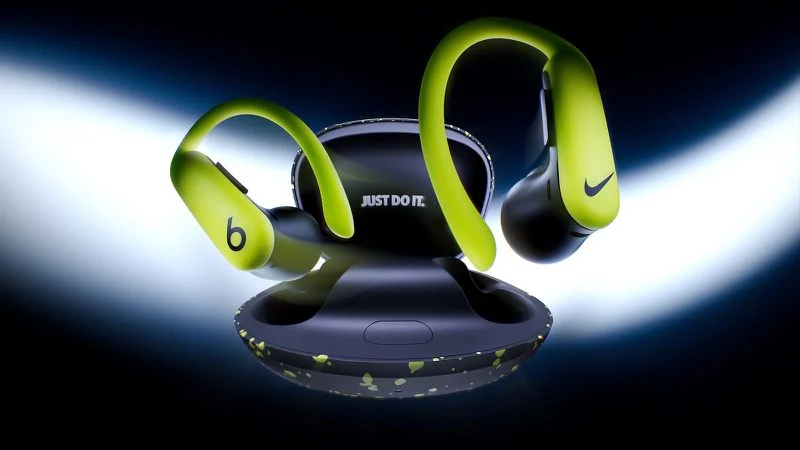
Apple's Beats brand is launching its first hardware collaboration with Nike today, debuting a new special-edition Nike-branded version of the Powerbeats Pro 2. Featuring Nike's "Volt" color palette with a matte black and Volt-speckled charging case with Nike's "Just Do It" slogan printed inside the lid, the buds themselves sport the Nike Swoosh logo on the right ear bud and the Beats "b" logo on the left ear bud.
Aside from the Nike-focused design, these are the same Powerbeats Pro 2 that were introduced last year, with the signature Powerbeats wraparound earhooks for stability, Active Noise Cancelling with Transparency mode, built-in heart rate monitoring, and up to 45 hours of battery life when tapping into the charging case to recharge.
The launch comes with a new ad campaign featuring NBA superstar and longtime Beats brand ambassador LeBron James and professional golfer Tom Kim.
"This isn't just a new colorway; it's a collision of two brands that define performance, culture, and sports—the attributes of today's athlete," said Chris Thorne, CMO of Beats. "By placing the Swoosh on our hardware for the first time, we're honoring the shared DNA of Beats and Nike—and celebrating ambassadors like LeBron James who embody both. It's a tribute to the grit, style, and sound that push people to their limits."
Powerbeats Pro 2 – Nike Special Edition will be available to purchase starting this Friday, March 20, at 9:00am Pacific Time, and will be priced at $249.99 in the United States. It will also be available in the United Kingdom, China, Japan, Germany, Canada, Australia, Singapore, France, Spain, India, Switzerland, the Netherlands, and Hong Kong, as well as at nike.com in the United States and at select Apple retail stores in the United States, United Kingdom, China, and Singapore.
Source: Macrumors










