 NEWS
NEWS
iOS 26.3 and iOS 26.4 Will Add These New Features to Your iPhone
 02/04/2026
 4542
4542
iOS 26.3 We are still waiting for the iOS 26.3 Release Candidate to come out, so the first iOS 26.4 beta is likely still at least a week or two away. Following beta testing, iOS 26.4 will likely be released to the general public in March or April.
Below, we have recapped known or rumored iOS 26.3 and iOS 26.4 features so far.
iOS 26.3
iPhone to Android Transfer Tool

iOS 26.3 makes it easier for iPhone users to switch to an Android device. A new tool allows you to place your iPhone next to an Android device to wirelessly transfer photos, messages, notes, apps, and more. You can also transfer your phone number.
In the iOS 26.3 beta, the new tool can be found in the Settings app, under General → Transfer or Reset iPhone → Transfer to Android. It is available worldwide.
Notification Forwarding in EU
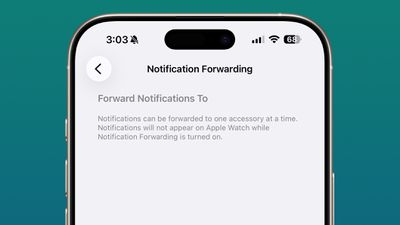
In the EU, iOS 26.3 introduces both a Notification Forwarding feature and AirPods-like proximity pairing for third-party accessories like earbuds and smartwatches.
Apple was required to make these changes to comply with the EU's Digital Markets Act.
End-to-End Encrypted RCS Preparations
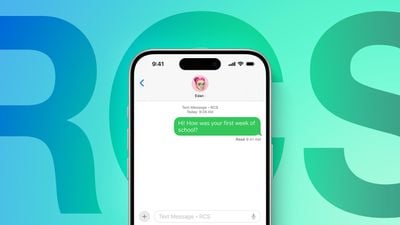
As of the second iOS 26.3 beta, Apple appears to be laying the groundwork for carriers to be able to support end-to-end encryption for RCS messages.
More
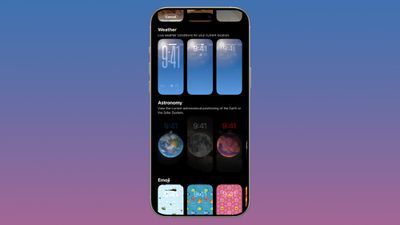
Starting with iOS 26.3, there is a dedicated section for Weather wallpapers, with three preset options available to choose from. To access them, tap and hold on the Lock Screen and tap on the plus sign in the bottom-right corner of the screen.
iOS 26.3 introduces a new "Limit Precise Location" setting that reduces the location data available to mobile networks to increase user privacy.
iOS 26.1 introduced a Background Security Improvement feature that is designed to provide security updates for Safari, WebKit, and some other system items between iOS software updates. Apple has been testing the feature with updates such as "iOS 26.3 (a)" and "iOS 26.3 (b)," but they do not actually contain any security fixes.
iOS 26.4
Personalized Siri
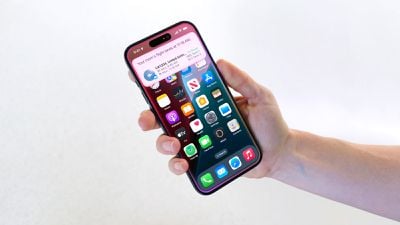
Last month, Apple and Google announced that Google Gemini will help power a more personalized version of Siri coming this year.
The more personalized version of Siri is expected to be introduced with iOS 26.4, following a lengthy delay. The new capabilities will include better understanding of a user's personal context, on-screen awareness, and deeper per-app controls, but some of this functionality might not be available until iOS 27 later this year.
For example, all the way back at WWDC 2024, Apple showed an iPhone user asking Siri about their mother's flight and lunch reservation plans based on info retrieved from the Mail and Messages apps.
Looking ahead, Apple is reportedly planning to launch a full-out Siri chatbot on iOS 27, allowing users to have ChatGPT-like conversations with Siri.
New Emoji
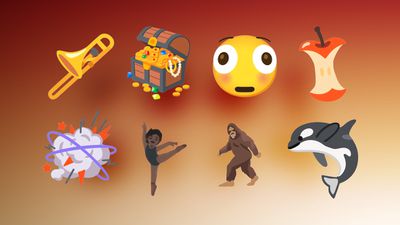
Last year, the Unicode Consortium previewed some of the new emoji that are expected to be added to the iPhone with iOS 26.4.
Here are nine of the new emoji:
- Trombone
- Treasure Chest
- Distorted Face
- Hairy Creature (aka Bigfoot or Sasquatch)
- Fight Cloud
- Apple Core
- Orca
- Ballet Dancers
- Landslide
Apple most recently added new emoji to the iPhone with iOS 18.4, an update that came out in March last year. iOS 17.4, iOS 16.4, and iOS 15.4 also introduced new emoji over the years, so the timing has become predictable by this point.
More
Macworld's Filipe Espósito leaked some other potential iOS 26.4 features:
- If you have credit card information stored in Apple's Passwords app, you will be able to AutoFill those details in third-party apps.
- You will be able to create folders in the Freeform app.
- Apple is apparently working on a new sports tier for the Apple TV app, but the report did not offer any further details about this.
- There are signs of "a new validation system that will check the integrity of the device before logging into Apple ID and iCloud."
- A new "Precise Outdoor Location" feature for AirPods in the Find My app.
iOS 26.4 should have many other new features, so stay tuned.ad
Source: Macrumors










