NEWS

iOS 26.3 Makes It Easier to Switch From iPhone to Android

12/16/2025

60

iOS 26.3 Makes It Easier to Switch From iPhone to Android


With iOS 26.3, Apple is making it simpler for iPhone users to transition to an Android smartphone, with new built-in tools for transferring data.


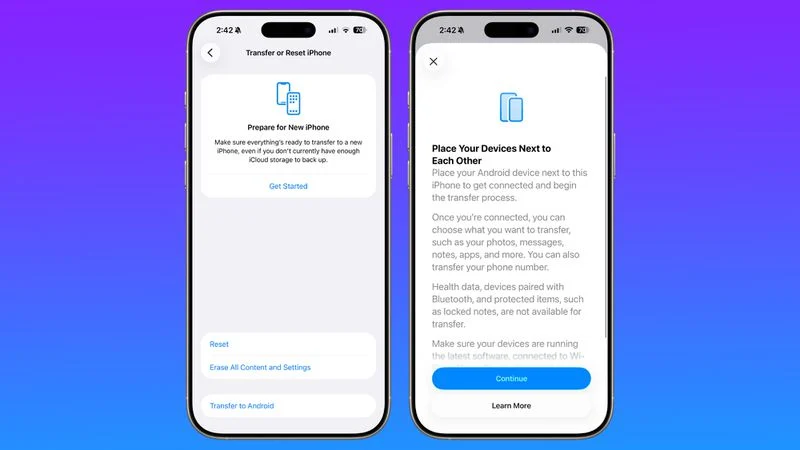
The new transfer tool allows an ‌iPhone‌ user to place their device next to an Android device to initiate a transfer process. With the two smartphones connected, users can opt to move over photos, messages, notes, apps, passwords, phone number, and more. Data transfers occur with no need to download and use a separate app, making the process simpler.


Health data, devices paired with Bluetooth, and protected items like locked notes are not transferred over to the new device.


Transferring data from an ‌iPhone‌ to an Android device wirelessly requires both devices to have the latest software, and to be connected to Wi-Fi with Bluetooth enabled. There will be an option to display a QR code on the Android device that the ‌iPhone‌ can scan to initiate the process, or there is an option to use a session ID and pairing code instead.


Google has also implemented a similar feature for transferring data from an Android to an ‌iPhone‌, so it is a two-way process between the platforms.


Last week, the European Commission said that Apple and Google designed and implemented the new transfer system to comply with the Digital Markets Act in the European Union, but it is not a Europe-only feature. The new setting is available worldwide in the iOS 26.3 beta, and it can be found under Settings > General > Transfer or Reset ‌iPhone‌ > Transfer to Android.


Source: Macrumors

Windows
Mac OS
iOS
Linux
3uTools
Win 64-bit For this device
V9.0 2025-11-11
Download
Win 32-bit For this device
V9.0 2025-11-11
Download
3uTools
Intel Chip How to Identify Chip Type
V9.0 2025-12-02
Download
Apple Silicon
V9.0 2025-12-02
Download
How to Identify Chip Type
1.  Click the Apple icon in the top-left corner of the screen and select About This Mac.
2.  Check the Processor or Chip field to determine if it is "Intel" or "Apple".
Please use the 3uTools PC client to install the iOS client:
1、 Install either the Windows or Mac version of 3uTools on your computer
2、 Open the PC client and connect your device to the computer via USB cable
3、 After the connection is successful, wait for the computer to automatically install the mobile app for the device, or locate “Install Mobile App” on the computer and manually click to install.
3uTools
deb file
V3.01 2025-11-20
Download
rpm file
V3.01 2025-11-20
Download
Windows
Windows
iOS
iOS
Android
Android
TV
TV
3uAirPlayer
Win 64-bit For this device
V6.0.2 2025-11-19
Download
Win 32-bit For this device
V6.0.2 2025-11-19
Download
iOS Device Mirroring (No App Required)
1、 Install 3uAirPlayer on the Windows PC
2、 Open Control Center and select Screen Mirroring
3、 From the list, choose your PC to start mirroring
4、 Or connect your iOS device to the PC via USB to begin mirroring
Scan to get "3uAirPlayer" App
3uAirPlayer TV V1.0.18
2025-11-28
TV System Requirements: Android 7.0 or later
Download the TV installation package, copy it to a USB drive, insert it into your TV or set-top box, then select the file from the home screen to install.