 NEWS
NEWS
Apple Pushes iPhone Users Still on iOS 18 to Upgrade to iOS 26
 12/03/2025
 2571
2571
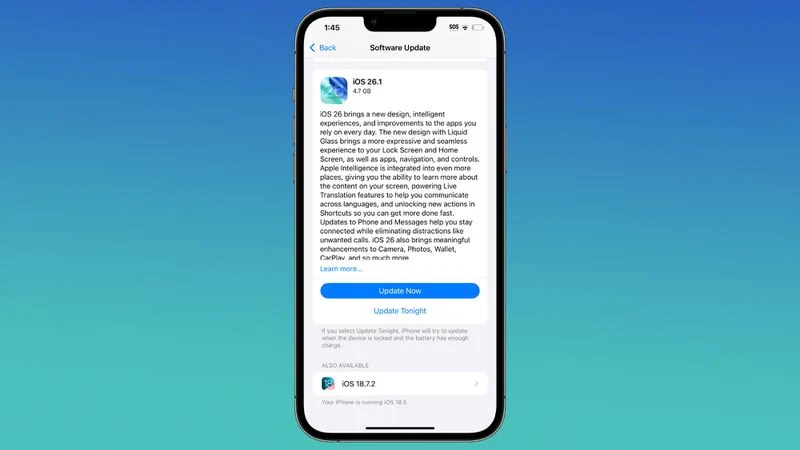
Apple is encouraging iPhone users who are still running iOS 18 to upgrade to iOS 26 by making the iOS 26 software upgrade option more prominent.
Since iOS 26 launched in September, it has been displayed as an optional upgrade at the bottom of the Software Update interface in the Settings app. iOS 18 has been the default operating system option, and users running iOS 18 have seen iOS 18 updates front and center.
Starting today, that's changing. iOS 18 users who have not upgraded to iOS 26 will now see iOS 26.1 as the recommended iOS update in the Settings app. iOS 18 updates are still an option, but are now displayed at the bottom of the app.
Apple isn't forcing users to upgrade to iOS 26, but it is pushing the update more heavily than it was before in an effort to increase installation numbers. Some users may be hesitant to upgrade to iOS 26 because of the Liquid Glass design overhaul that makes major changes to the iPhone interface.
Allowing users to stay on the prior-generation version of iOS is an option that Apple has provided since iOS 15, but it doesn't last forever. Right now, Apple is providing iOS 18 security updates to those who choose to stay on that operating system, but that may stop in the coming months.
After pushing people to upgrade to iOS 26 by making the option more prominent, Apple will likely remove the option to stay on iOS 18, providing iOS 26 as the only upgrade available on devices that support the newer software. Eventually, customers who want to stay up to date on security fixes will need to transition to iOS 26, though Apple will continue to provide iOS 18 updates for devices that do not support iOS 26.
Apple hasn't released iOS 26 adoption numbers, so it is unclear how many people have decided to upgrade. Apple typically updates its iOS numbers several months after a new version of iOS launches, so we could get details in January or February.
Upgrading to iOS 26 from iOS 18 is irreversible, and Apple does not provide a way to downgrade back to the prior version of iOS.
Source: Macrumors










