
NEWS

iPhone 8 To Pack 7 Plus Battery Capacity In Standard 7 Size

02/14/2017

3565

Phonemakers often boast bigger, brighter screens, better graphics, snappier processors and miscellaneous features like curved glass and dual camera setups. But as phones become more sophisticated and capable, we need phones that have the battery reserve to back it up. Thankfully, the latest reports from long-time KGI Securities analyst Ming-Chi Kuo reveal the next iPhone 8 will boast iPhone 7 Plus battery size within a standard iPhone 7 body.


According to Kuo's report, the standard iPhone 8 could have a battery with a capacity of 2,700 mAh, just 200 shy of the current iPhone 7 Plus unit. What's more, the iPhone 8's purported OLED screen will also help the phone gain a little extra mileage on a single charge as well.
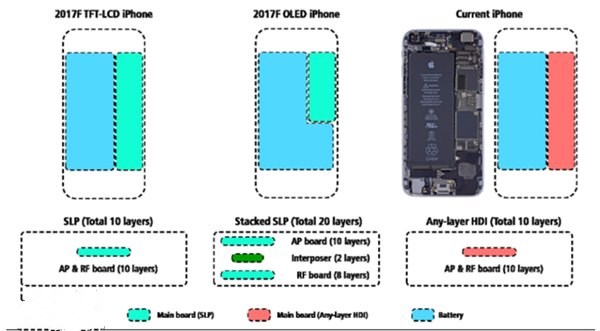

iPhone 8 To Pack 7 Plus Battery Capacity In Standard 7 Size


However, combined with reports of a larger edge-to-edge screen to fill in the real estate on the front of an iPhone 8, a question of physical packaging comes into question – how does Apple plan to cram everything in? Kuo's report suggests Apple is working on a new stacked-logic board, which will essentially enable Apple to shrink internal processors and circuitry in order to offer additional space to other things. 


Time will tell whether Kuo's reports are accurate, but the source has been reliable thus far. Stay tuned as we expect to learn more about the upcoming iPhone in the months ahead.


Source: idigtaltimes 


Windows
Mac OS
iOS
Linux
3uTools
Win 64-bit For this device
V9.0 2025-11-11
Download
Win 32-bit For this device
V9.0 2025-11-11
Download
3uTools
Intel Chip How to Identify Chip Type
V9.0 2025-12-02
Download
Apple Chip
V9.0 2025-12-02
Download
How to Identify Chip Type
1.  Click the Apple icon in the top-left corner of the screen and select About This Mac.
2.  Check the Processor or Chip field to determine if it is "Intel" or "Apple".
Please use the 3uTools PC client to install the iOS client:
1、 Install either the Windows or Mac version of 3uTools on your computer
2、 Open the PC client and connect your device to the computer via USB cable
3、 After the connection is successful, wait for the computer to automatically install the mobile app for the device, or locate “Install Mobile App” on the computer and manually click to install.
3uTools
deb file
V3.01 2025-11-20
Download
rpm file
V3.01 2025-11-20
Download
Windows
Windows
iOS
iOS
Android
Android
TV
TV
3uAirPlayer
Win 64-bit For this device
V6.0.2 2025-11-19
Download
Win 32-bit For this device
V6.0.2 2025-11-19
Download
iOS Device Mirroring (No App Required)
1、 Install 3uAirPlayer on the Windows PC
2、 Open Control Center and select Screen Mirroring
3、 From the list, choose your PC to start mirroring
4、 Or connect your iOS device to the PC via USB to begin mirroring
Scan to get "3uAirPlayer" App
3uAirPlayer TV V1.0.18
2025-11-28
TV System Requirements: Android 7.0 or later
Download the TV installation package, copy it to a USB drive, insert it into your TV or set-top box, then select the file from the home screen to install.




