 NEWS
NEWS
Apple Shares Are Doing Something Very Unusual
 01/26/2017
 3492
3492
A falling apple was said to inspire Isaac Newton to articulate the law of gravity. More recently, stagnant shares of Apple could have inspired his first law of motion: "Every body perseveres in its state of rest ... unless it is compelled to change that state by forces impressed thereon."
In the past few weeks, the tech giant has been glued to the $120 level. The stock has closed less than 1 percent away from $120 in each of the past 11 sessions. It has closed less than 0.2 percent away from $120 in each of the past six sessions. And in two of those sessions, it closed at $120 exactly.
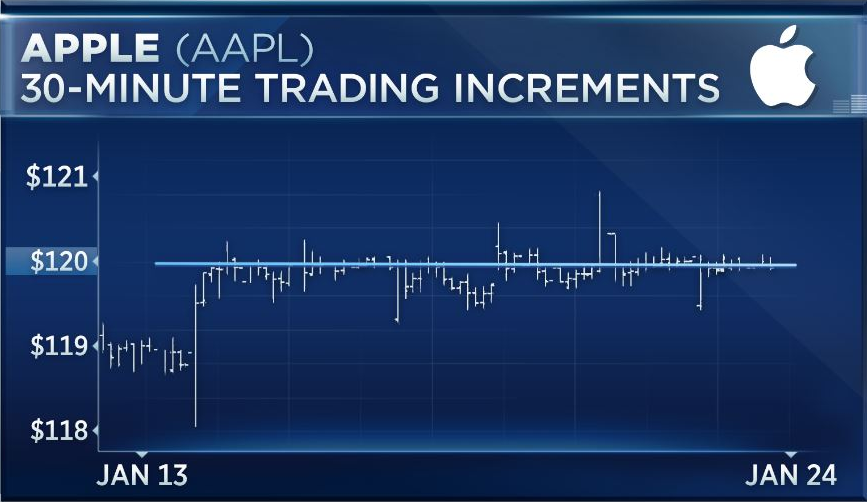
The stock didn't even see fit to fall Tuesday after Barclays analyst Mark Moskowitz downgraded it to equal weight and cut its price target, complaining that the company's "growth rebound could be elusive" given the dearth of "needle movers." Apple shares shrugged, logging a 0.09 percent decline on the session, though it did underperform the major indexes.
In part, the Apple stagnation reflects the stasis seen in the broader market, which before Tuesday had failed to log a daily move of more than 0.4 percent for 2 ½ weeks. But there is something special about the $120 level.
Last Friday, a huge bundle of options expired on Apple, and the most popular striking price for those options was $120. A large options holding tends to "pin" a stock to the most relevant level, which helps explain why the stock closed on Friday at $120.00. Since then, investors have apparently seen little reason to push the stock far from this well-trodden level.
"You're seeing an influx of buyers and sellers at this level," options trader Andrew Keene of AlphaShark observed. "But earnings will move the needle a great deal."
The company is scheduled to report earnings Jan. 31.
Source: CNBC










