 NEWS
NEWS
Purported iPhone Xr SIM Trays Leak, Showing 6.1-inch Model Colors Including Blue and Red
 09/12/2018
 3941
3941
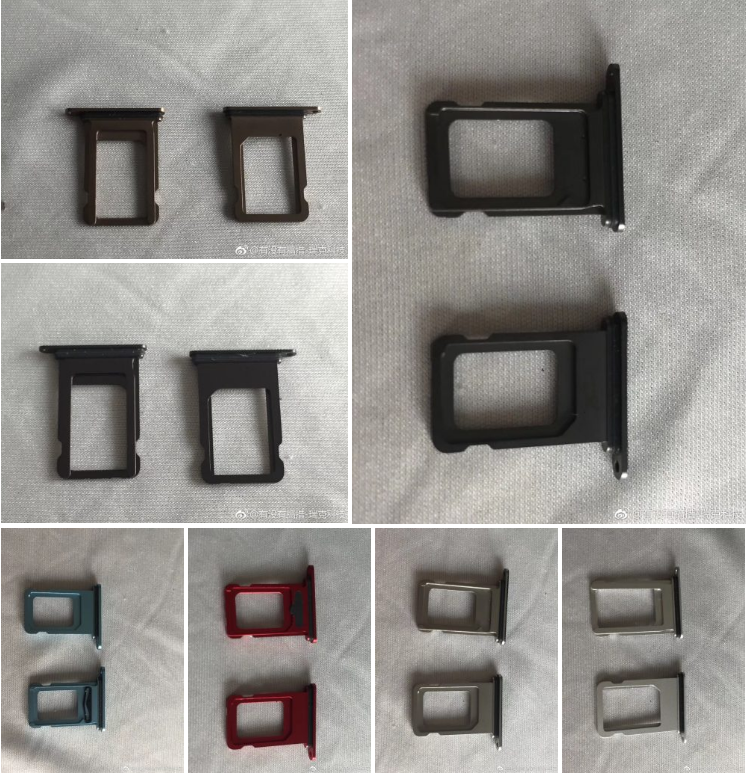
We expect Apple to unveil three new flagship iPhones tomorrow: iPhone Xs and iPhone Xs Max with OLED screens and better cameras, and an entry priced model with LCD possibly called iPhone Xr that will introduce new colors. Now images claiming to show the SIM trays (and thus, colors) of the 6.1-inch LCD model have surfaced on Weibo.
While Apple’s marketing names for these colors are anyone’s guess at this point, there are at least two hues that stand out here: red and blue. Apple has released two generations of red iPhones to date (iPhone 7/7 Plus and iPhone 8/8 Plus), but only as mid-cycle Product(RED) versions and not at launch. The blue SIM tray, if actually for the new iPhone, shows an interesting take on the color.
Also spotted among at least seven images shared on Weibo showing purported SIM trays for the unreleased iPhone are two shots of space gray or black, two shades of silver, and a brownish gold color. The 6.1-inch iPhones are expected to have aluminum sides and glass backs like the iPhone 8 and iPhone 8 Plus which is sold in space gray, silver, and gold (with glass colored slightly off from the border color).
Over the weekend, three “prototype” iPhones surfaced claiming to show the back sides of four of these iPhones in space gray, silver, red, and light gold.
Analyst Ming-Chi Kuo has predicted that Apple will offer six versions of the 6.1-inch iPhone that he describes as “gold, grey, white, blue, red and orange”, while Macotakara has separately reported white, black, flash yellow, bright orange, electric blue, and taupe.
Without consensus, this is one more mystery we may have to wait until tomorrow to see solved. The mid-sized, entry-priced flagship iPhone will likely leverage color as a marketing feature, though, with the similar styled iPhone Xs and iPhone Xs Max carrying a premium price.
Source: 9to5mac










