 NEWS
NEWS
Apple Extends Free Repairs of Anti-Reflective Coating on Select MacBook and MacBook Pro Models
 11/20/2017
 4023
4023
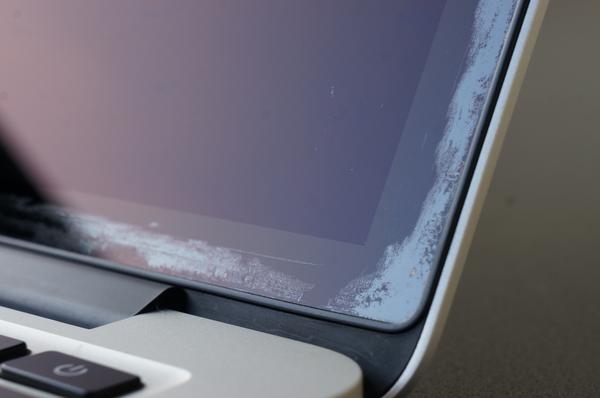
Apple has authorized coverage within four years from the original purchase date of affected models, according to an internal document distributed to Apple Authorized Service Providers and later obtained by MacRumors.
Eligible models, listed below, qualify for a free display replacement within the four-year coverage period. Check your receipt to determine the exact purchase date of your MacBook or MacBook Pro.
• MacBook Pro (13-inch, Early 2013)
• MacBook Pro (15-inch, Early 2013)
• MacBook Pro (13-inch, Late 2013)
• MacBook Pro (15-inch, Late 2013)
• MacBook Pro (13-inch, Mid 2014)
• MacBook Pro (15-inch, Mid 2014)
• MacBook Pro (13-inch, Early 2015)
• MacBook Pro (15-inch, Mid 2015)
• MacBook Pro (13-inch, 2016)
• MacBook Pro (15-inch, 2016)
• MacBook Pro (13-inch, 2017)
• MacBook Pro (15-inch, 2017)
• MacBook (12-inch, Early 2015)
• MacBook (12-inch, Early 2016)
• MacBook (12-inch, Early 2017)
Apple's document states that all 2012 MacBook Pro models are no longer eligible since they were discontinued over four years ago.
Apple previously confirmed to us that this repair program continues to be handled internally rather than being publicly announced.
Affected customers can schedule a Genius Bar appointment at an Apple Store using the Apple Support app. Or, on the Get Support page, click Mac → Mac Notebooks → Hardware Issues → Display Issue and options should be presented to initiate a repair or contact Apple via phone, email, or online chat.
Apple's support website will ask for your Mac's serial number, which can be found by clicking on the Apple logo in the top-left corner of the screen and clicking on About This Mac in the dropdown menu.
We've learned that Apple has supposedly prohibited support advisors from mentioning details about the anti-reflective coating repair program in online chat sessions, so visiting an Apple Store may be required. If you contact Apple by phone, asking for your call to be escalated to a senior advisor may help.
Affected customers can also visit an Apple Authorized Service Provider to determine if their notebook is eligible for coverage. Apple's document states that these third-party repair shops can even replace displays with other damage free of charge so long as the anti-reflective coating issues are present.
Apple's internal document also states that customers who already incurred out-of-warranty costs related to this issue continue to be eligible for a refund, which can be initiated by contacting Apple support directly.
Apple first began this repair program in October 2015, and already extended it once, after some MacBook and MacBook Pro users experienced issues with the anti-reflective coating wearing off or delaminating on Retina displays.
The damage appears to be caused by a variety of factors, including the pressure of the keyboard and trackpad on the display when closed, and the use of incorrect third-party cleaning solutions with microfiber cloths.
Over 12,000 customers joined a Facebook group dedicated to the issue, and hundreds of others have claimed to be affected across the Apple Support Communities, MacRumors forums, Twitter, Reddit, and other discussion platforms. The website Staingate.orgcontains a gallery of damaged displays.
Source: macrumors










