 NEWS
NEWS
Availability of Apple's 12.9" iPad Pro As Rumored Update Looms
 04/19/2017
 3780
3780
Possibly shedding some light on an anticipated refresh, the 12.9-inch iPad Pro stock situation appears to be dwindling, with nearly no stock of popular models in high-volume stores, and an expected refresh date across the board of May 16.
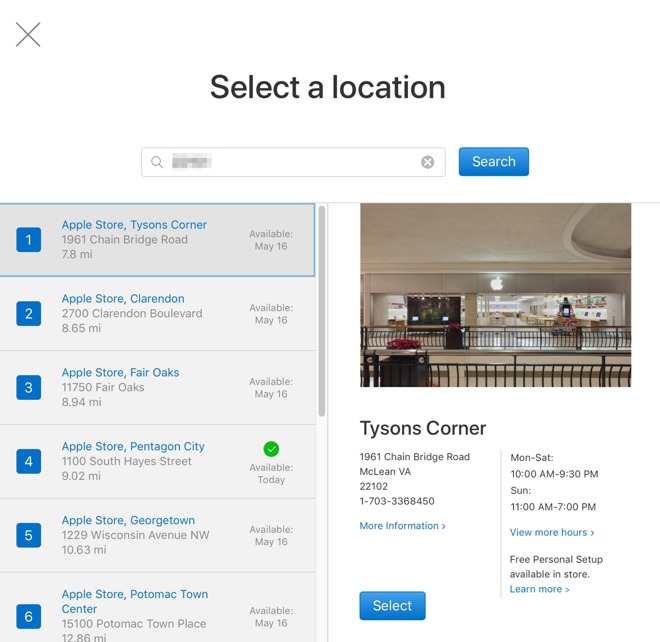
Spot-checks of 20 Apple Retail stores show decreasing stock levels or no stock at all at retail, with the least expensive models, the 32-gigabyte with Wi-Fi and 128-gigabyte with LTE models, most profoundly impacted Apple Retail-wide. No guidance has been issued to stores as of yet on the declining stock levels.
It is unclear if this is an anomaly related to overseas shipment of production, or an indication of a looming refresh. Similarly, in late February, all 12.9-inch iPad Pro models showed estimated ship dates of 2 to 3 weeks. Additionally, Apple's in-store pickup option was pushed back from February 20, exactly four weeks to Mar. 20.
The stock shortages from late February rectified themselves the first week of March, with everything suddenly made available both online, and in-store. However last time, the depleted stock on the 32GB model at our polled retail stores hadn't existed for as long as it has this time.
An iPad Pro refresh in early 2017 was prognosticated last year, with an update to the 9.7-inch model, a new 10.5-inch version, and a refreshed 12.9-inch model. It is unclear if the rumor mill picked up on the 2017 iPad (also known as the fifth generation iPad) as part of the refresh, or if a 9.7-inch iPad Pro is coming.
Source: appleinsider










