
NEWS

Apple Granted A Patent For Possible Future Avatar Creation And Editing App

02/22/2017

3655

The U.S. Patent and Trademark Office officially published a series of 58 newly granted patents for Apple Inc. today. In this particular report we cover Apple's invention relating to advanced creation and editing tools for Avatars. In the future, Apple envisions Avatars working with a wide variety of apps including but not limited to address books, chat sessions, video conferencing, email, games or any other application that could support an animated avatar. Apple is even working on a few humorous animated Avatars as well that will be offered alongside emoticons. For more details and patent figures review our original 2011 report titled "Apple Details Advanced Avatar Editing App with Funny Animations."
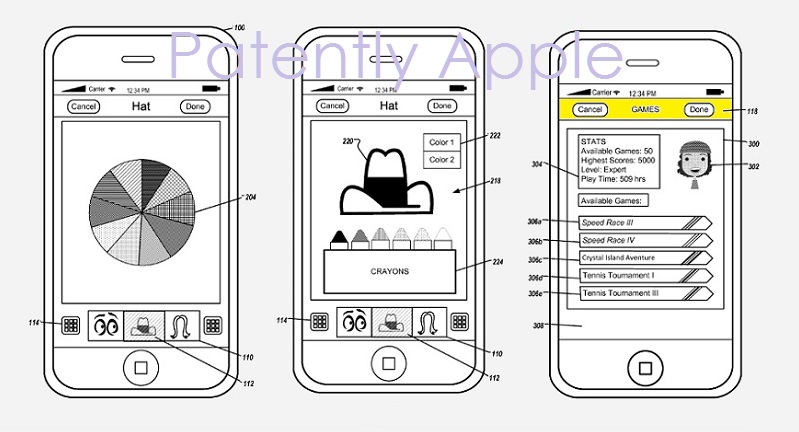

Apple Granted A Patent For Possible Future Avatar Creation And Editing App


Apple's granted patent 9,576,400 was originally filed in Q2 2011 and published today by the US Patent and Trademark Office.


Apple's most advanced avatar invention surfaced a year later and clearly designed for the iPad. See our report titled "Apple Invents a 3D Creation App for Games and Futuristic Displays." 
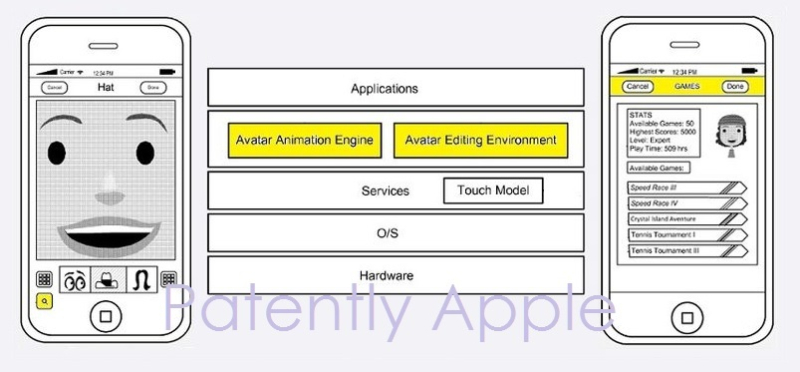
 

Apple Granted A Patent For Possible Future Avatar Creation And Editing App


Patently Apple presents only a brief summary of granted patents with associated graphics for journalistic news purposes as each Granted Patent is revealed by the U.S. Patent & Trademark Office. Readers are cautioned that the full text of any Granted Patent should be read in its entirety for full details. 
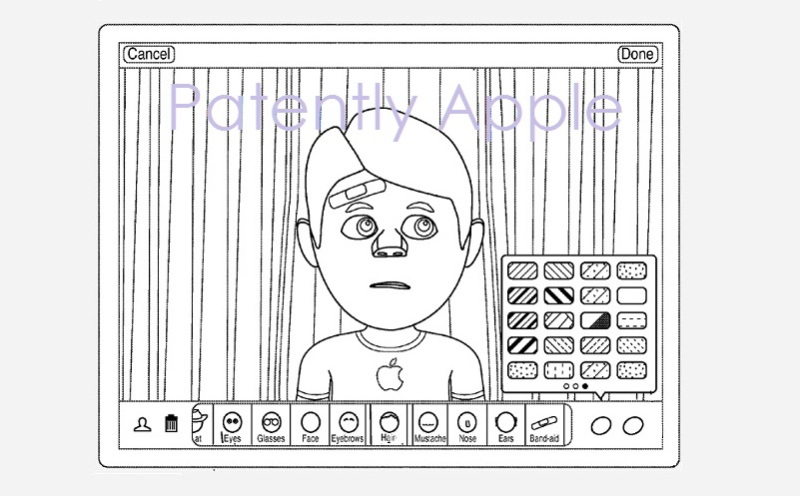

Apple Granted A Patent For Possible Future Avatar Creation And Editing App

Source: patentlyapple


Windows
Mac OS
iOS
Linux
3uTools
Win 64-bit For this device
V9.0 2025-11-11
Download
Win 32-bit For this device
V9.0 2025-11-11
Download
3uTools
Intel Chip How to Identify Chip Type
V9.0 2025-12-02
Download
Apple Silicon
V9.0 2025-12-02
Download
How to Identify Chip Type
1.  Click the Apple icon in the top-left corner of the screen and select About This Mac.
2.  Check the Processor or Chip field to determine if it is "Intel" or "Apple".
Please use the 3uTools PC client to install the iOS client:
1、 Install either the Windows or Mac version of 3uTools on your computer
2、 Open the PC client and connect your device to the computer via USB cable
3、 After the connection is successful, wait for the computer to automatically install the mobile app for the device, or locate “Install Mobile App” on the computer and manually click to install.
3uTools
deb file
V3.01 2025-11-20
Download
rpm file
V3.01 2025-11-20
Download
Windows
Windows
iOS
iOS
Android
Android
TV
TV
3uAirPlayer
Win 64-bit For this device
V6.0.2 2025-11-19
Download
Win 32-bit For this device
V6.0.2 2025-11-19
Download
iOS Device Mirroring (No App Required)
1、 Install 3uAirPlayer on the Windows PC
2、 Open Control Center and select Screen Mirroring
3、 From the list, choose your PC to start mirroring
4、 Or connect your iOS device to the PC via USB to begin mirroring
Scan to get "3uAirPlayer" App
3uAirPlayer TV V1.0.18
2025-11-28
TV System Requirements: Android 7.0 or later
Download the TV installation package, copy it to a USB drive, insert it into your TV or set-top box, then select the file from the home screen to install.





