
TUTORIALS

How to Fully Uninstall Electra Beta Jailbreak From your iPhone

03/15/2018

18672

Update: How to Remove Electra Jailbreak from iPhone?


Electra toolkit is not a full jailbreak,this tool is still in beta development phase. Coolstar implemented a proper uninstall bash script. This script completely cleans and removes every trace of this application including Anemone and associated themes.


Here’s an easy step-by-step tutorial for completely removing and uninstalling this beta version from your device.

How to Fully Uninstall Electra Beta Jailbreak From your iPhone

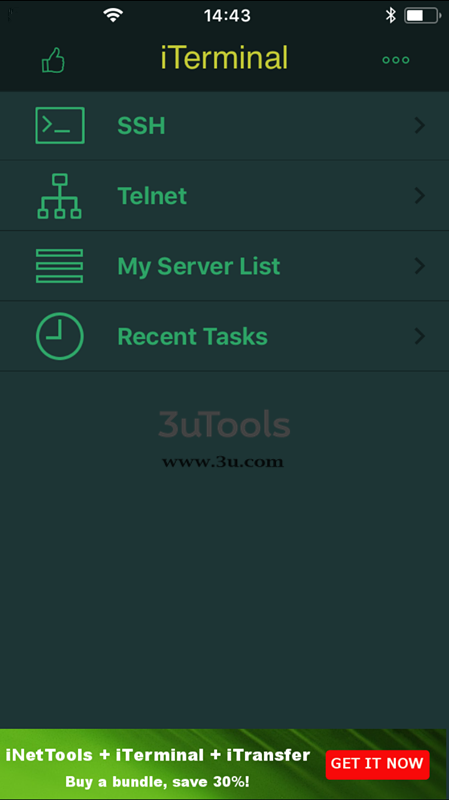
Step 1 Install the iTerminal app from the official App Store. You don’t need to purchase the premium version, the free version will suffice.
How to Fully Uninstall Electra Beta Jailbreak From your iPhoneHow to Fully Uninstall Electra Beta Jailbreak From your iPhone


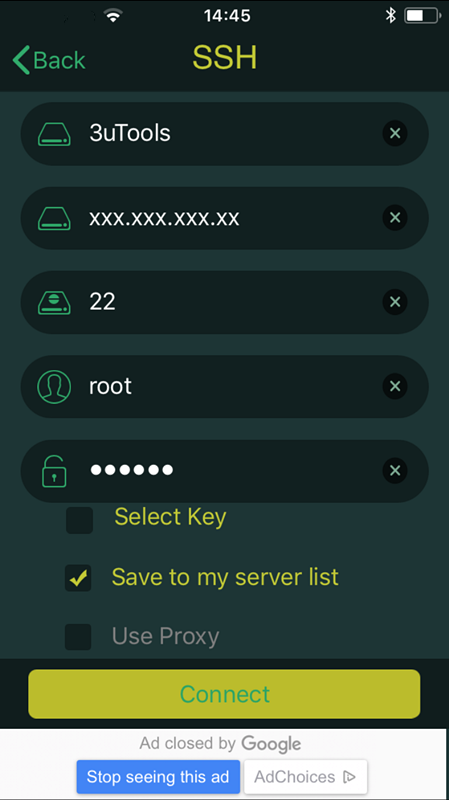
Step 2 Establish an SSH connection using the following details –


  • Nickname – You can input anything here

  • Host Name – Your Wifi IP Address

  • Port – 2222

  • User Name – root

  • Password – alpine


Step 3 Tap Connect to enter the terminal.


Step 4 Type the following command and execute it. What this does is, it runs the inbuilt unjailbreak.sh bash script.


bash /bootstrap/unjailbreak.sh


Step 5 Wait for it remove everything associated with the toolkit. Once the removal process is over, go back to your home screen and ensure the app is gone. This should hopefully fix all glitches and bugs you were experiencing.


For more jailbreak tutorials and guides, follow us on Twitter and Facebook.

Windows
Mac OS
iOS
Linux
3uTools
Win 64-bit For this device
V9.0 2025-11-11
Download
Win 32-bit For this device
V9.0 2025-11-11
Download
3uTools
Intel Chip How to Identify Chip Type
V9.0 2025-12-02
Download
Apple Silicon
V9.0 2025-12-02
Download
How to Identify Chip Type
1.  Click the Apple icon in the top-left corner of the screen and select About This Mac.
2.  Check the Processor or Chip field to determine if it is "Intel" or "Apple".
Please use the 3uTools PC client to install the iOS client:
1、 Install either the Windows or Mac version of 3uTools on your computer
2、 Open the PC client and connect your device to the computer via USB cable
3、 After the connection is successful, wait for the computer to automatically install the mobile app for the device, or locate “Install Mobile App” on the computer and manually click to install.
3uTools
deb file
V3.01 2025-11-20
Download
rpm file
V3.01 2025-11-20
Download
Windows
Windows
iOS
iOS
Android
Android
TV
TV
3uAirPlayer
Win 64-bit For this device
V6.0.2 2025-11-19
Download
Win 32-bit For this device
V6.0.2 2025-11-19
Download
iOS Device Mirroring (No App Required)
1、 Install 3uAirPlayer on the Windows PC
2、 Open Control Center and select Screen Mirroring
3、 From the list, choose your PC to start mirroring
4、 Or connect your iOS device to the PC via USB to begin mirroring
Scan to get "3uAirPlayer" App
3uAirPlayer TV V1.0.18
2025-11-28
TV System Requirements: Android 7.0 or later
Download the TV installation package, copy it to a USB drive, insert it into your TV or set-top box, then select the file from the home screen to install.




