
TUTORIALS

The Latest & Current State of 10.3.1 / 10.3 / 10.2.1 Jailbreak

04/06/2017

11556

Can one jailbreak iOS 10.3.1, 10.3 or iOS 10.2.1? If not, what is the latest current state of an iOS 10.3.1 / 10.3 / 10.2.1 jailbreak for iPhone and iPad?

The Latest & Current State of 10.3.1 / 10.3 / 10.2.1 Jailbreak


Over time, we’ve come to understand that movement in the jailbreak community tends to come in fits and starts. There’s inevitably a period of time where nothing happens, and the wheels turn slow, which is generally followed by a period of rapid progression where key members of the community tend to work closely together to announce and release exploits and tools.


As shown below, in 3uTools Jailbreak part, we’ve supported iOS 10.2 jailbreak, you’re able to easily jailbreak it and enjoy the jailbreak benefits yalu102 brings.
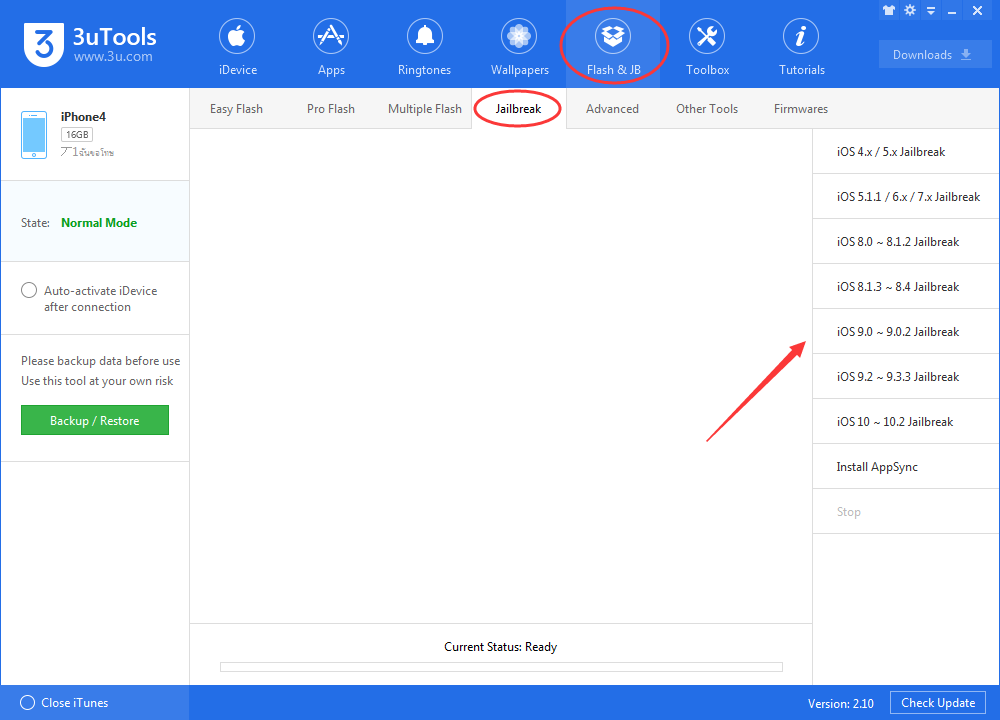
 

The Latest & Current State of 10.3.1 / 10.3 / 10.2.1 Jailbreak


Luca Todesco has proven himself to be one skillful hacker with the necessary skills and abilities, but releasing a jailbreak for iOS 10.2.1-10.3.x will be an entirely different challenge, especially given that iOS 10.3.x introduces Apple's new File System APFS. There’s then also the fact that Todesco himself has already said that he will stop working on all public iOS research work after 10.2 jailbreak.


Final version of iOS 10.3 is now available to download. There is obviously no jailbreak available for it. Stay on lower firmware versions if jailbreak is what you want.


As always, we will endeavor to keep you abreast with the latest iOS 10.2.1-10.3.x jailbreak status, and if anything changes we will bring it directly to you immediately. Stay tuned.


Windows
Mac OS
iOS
Linux
3uTools
Win 64-bit For this device
V9.0 2025-11-11
Download
Win 32-bit For this device
V9.0 2025-11-11
Download
3uTools
Intel Chip How to Identify Chip Type
V9.0 2025-12-02
Download
Apple Silicon
V9.0 2025-12-02
Download
How to Identify Chip Type
1.  Click the Apple icon in the top-left corner of the screen and select About This Mac.
2.  Check the Processor or Chip field to determine if it is "Intel" or "Apple".
Please use the 3uTools PC client to install the iOS client:
1、 Install either the Windows or Mac version of 3uTools on your computer
2、 Open the PC client and connect your device to the computer via USB cable
3、 After the connection is successful, wait for the computer to automatically install the mobile app for the device, or locate “Install Mobile App” on the computer and manually click to install.
3uTools
deb file
V3.01 2025-11-20
Download
rpm file
V3.01 2025-11-20
Download
Windows
Windows
iOS
iOS
Android
Android
TV
TV
3uAirPlayer
Win 64-bit For this device
V6.0.2 2025-11-19
Download
Win 32-bit For this device
V6.0.2 2025-11-19
Download
iOS Device Mirroring (No App Required)
1、 Install 3uAirPlayer on the Windows PC
2、 Open Control Center and select Screen Mirroring
3、 From the list, choose your PC to start mirroring
4、 Or connect your iOS device to the PC via USB to begin mirroring
Scan to get "3uAirPlayer" App
3uAirPlayer TV V1.0.18
2025-11-28
TV System Requirements: Android 7.0 or later
Download the TV installation package, copy it to a USB drive, insert it into your TV or set-top box, then select the file from the home screen to install.



