 NEWS
NEWS
Apple Planning Face ID for MacBook Pro and iMac — Plus a Notch
 03/27/2020
 2544
2544
Apple intends to bring the Face ID biometric authentication system introduced with the iPhone, to its Mac range, including both portables and desktops.
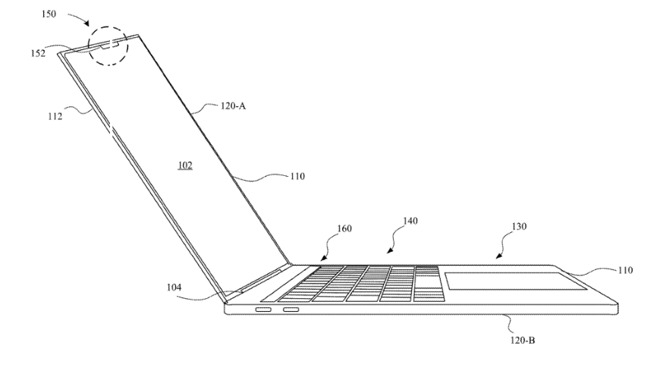
Notice the circled part at the top of the screen on this MacBook Pro-like sketch
Just as Touch ID began on its iPhone before spreading to iPad, and then both the MacBook Pro and MacBook Air, so Face ID is coming to Apple's range of Macs. It's been rumored before, and Apple has said that Face ID will come to more devices, but a new patent application is the first to specify that it will be brought to some form of MacBook.
"Light Recognition Module for Determining a User of a Computing Device," US Patent No. 20200097747, is chiefly concerned with adding Face ID to MacBooks, although instead of those terms, it consistently refers to a light recognition module and a laptop.
Apple's patent application stresses how users are storing sensitive information, and also that the capabilities of a laptop mean people use them to do ever more complex work —which is potentially a problem.
"By performing these complex functions, sensitive data associated with these users may be gathered and/or stored by these computing devices," says Apple. "To prevent unauthorized users from accessing this sensitive data, these computing devices may incorporate systems and mechanisms for authenticating users."
As important as this security is, it has to work within the constraints of the devices themselves. "Due to the amount of limited space available with internal cavities of these computing devices, these authentication schemes should be compact (or have thin profiles) without sacrificing accuracy of user recognition," it continues.
The answer is to deploy "a light pattern recognition module that may be incorporated within a computing device (e.g., a laptop computer, a notebook, a desktop computer, etc.)."
"In particular," explains the patent, "the light pattern recognition module includes a light emitter that is capable of projecting a predetermined pattern of light (e.g., infrared light) and a light detector that is capable of detecting a pattern of light caused by reflection of the predetermined pattern of light from an object (e.g., a user)."
The patent then goes into great detail about the specifics of how a light dot projector is used, and how the results are interpreted. But the short version is that this Face ID on MacBooks —and it's coming with a notch. Although it's possible that the notch will not be exactly the same as seen on iPhones.
Apple proposes that the Face ID module will be in a partition, which could be "disposed adjacent to the display layer," or above it. "In some examples, the partition is a notch, a circle, an ellipse, a polygonal shape, a series of polygonal shapes, a curvilinear shape, or the like."
The familiar iMac screen gets a proposed notch
All of the patent application's drawings that show a recognizable MacBook Pro also show the notch as being like those on the iPhone.
However, while the patent text is overwhelmingly concerned with a laptop, one single drawing in it shows the Face ID notch being used in an iMac-style chassis.
Apple is continually researching many different technologies, as well as very many different ways of implementing them, and applying for a patent is not proof that a product will ever be released. Nonetheless, given Apple's previous statement about Face ID coming to more devices, and the way its progression is following the same line that Touch ID took, it is more reasonable than usual to expect that the technology will be coming to the Mac soon.
The patent is credited to six inventors, four of whom —Paul X. Wang, Keith J. Hendren, Adam T. Garelli, and Dinesh C. Mathew —are also listed on a related patent that would see the iMac made from a single sheet of glass.
Source: Appleinsider









