
NEWS

Apple Expands AR 'Quick Look' Shopping Tools to Major Retailer Sites

02/14/2020

2286

Retailers are getting new customizable buttons to help sell products to iPhone users utilizing ARKit's 'Quick Look' feature.
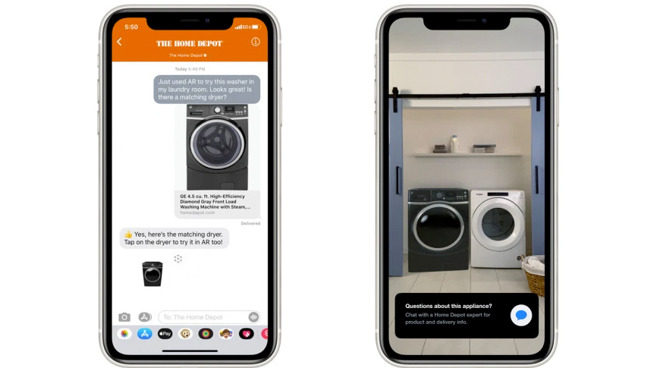
Apple Expands AR 'Quick Look' Shopping Tools to Major Retailer Sites


Apple's AR "Quick Look" tool just got an upgrade, giving retailers the ability to sell their products within an augmented reality screen. Home Depot, Wayfair, Bang & Olufsen, and 1-800-Flowers all feature the new update.

The update, which has begun rolling out recently, adds a useful button to the Quick Look screen. Users who view products in their home will also be able to interact with a product-specific button that the retailer customizes through ARKit. This button can be set to a few different options including a "buy now" option with Apple Pay integration and an option to check for stock at a local store.

Quick Look debuted with ARKit 2 in 2018. It can be accessed from apps like Safari, Messages, and the retailers specific app. The technology has been slowly making its way into the retail world, and the retailers who have used it have seen positive results.

In 2018, Houzz CEO Adi Tatarko said that users of their AR tools were 11 times more likely to make a purchase. Build.com found that people who checked out an item in AR were 22% less likely to return it, reports TechCrunch.


Source: Appleinsider

Windows
Mac OS
iOS
Linux
3uTools
Win 64-bit For this device
V9.0 2025-11-11
Download
Win 32-bit For this device
V9.0 2025-11-11
Download
3uTools
Intel Chip How to Identify Chip Type
V9.0 2025-12-02
Download
Apple Chip
V9.0 2025-12-02
Download
How to Identify Chip Type
1.  Click the Apple icon in the top-left corner of the screen and select About This Mac.
2.  Check the Processor or Chip field to determine if it is "Intel" or "Apple".
Please use the 3uTools PC client to install the iOS client:
1、 Install either the Windows or Mac version of 3uTools on your computer
2、 Open the PC client and connect your device to the computer via USB cable
3、 After the connection is successful, wait for the computer to automatically install the mobile app for the device, or locate “Install Mobile App” on the computer and manually click to install.
3uTools
deb file
V3.01 2025-11-20
Download
rpm file
V3.01 2025-11-20
Download
Windows
Windows
iOS
iOS
Android
Android
TV
TV
3uAirPlayer
Win 64-bit For this device
V6.0.2 2025-11-19
Download
Win 32-bit For this device
V6.0.2 2025-11-19
Download
iOS Device Mirroring (No App Required)
1、 Install 3uAirPlayer on the Windows PC
2、 Open Control Center and select Screen Mirroring
3、 From the list, choose your PC to start mirroring
4、 Or connect your iOS device to the PC via USB to begin mirroring
Scan to get "3uAirPlayer" App
3uAirPlayer TV V1.0.18
2025-11-28
TV System Requirements: Android 7.0 or later
Download the TV installation package, copy it to a USB drive, insert it into your TV or set-top box, then select the file from the home screen to install.




