
NEWS

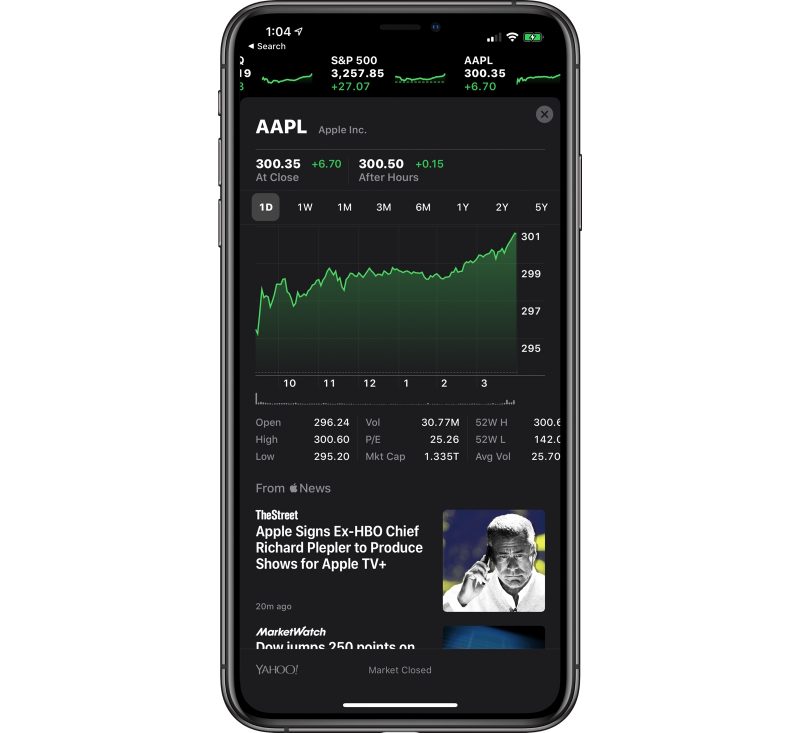
Apple Stock Sets New All-Time High, Closes at $300 Per Share

01/03/2020

2505

Apple shares today hit a new all-time high and reached a closing price of $300 following yesterday's New Year's holiday, marking significant growth over the course of the last year. 

In early January 2019, Apple shares were at $144 after Apple lowered its revenue guidance for Q1 2019 by up to $9 billion, spooking investors. 
Apple Stock Sets New All-Time High, Closes at $300 Per Share
iPhone sales in late 2018 and 2019 saw a major drop in China due to rising ‌iPhone‌ prices and trade tensions, but Apple has managed to boost sales by lowering prices, offering promotions, and introducing the iPhone 11 at a new $699 price point. 

Apple stock has surged over the course of the last two months thanks to reports of better than expected ‌iPhone 11‌ and 11 Pro sales and reports of stronger than ever AirPodssales.


Source: Macrumors

Windows
Mac OS
iOS
Linux
3uTools
Win 64-bit For this device
V9.0 2025-11-11
Download
Win 32-bit For this device
V9.0 2025-11-11
Download
3uTools
Intel Chip How to Identify Chip Type
V9.0 2025-12-02
Download
Apple Chip
V9.0 2025-12-02
Download
How to Identify Chip Type
1.  Click the Apple icon in the top-left corner of the screen and select About This Mac.
2.  Check the Processor or Chip field to determine if it is "Intel" or "Apple".
Please use the 3uTools PC client to install the iOS client:
1、 Install either the Windows or Mac version of 3uTools on your computer
2、 Open the PC client and connect your device to the computer via USB cable
3、 After the connection is successful, wait for the computer to automatically install the mobile app for the device, or locate “Install Mobile App” on the computer and manually click to install.
3uTools
deb file
V3.01 2025-11-20
Download
rpm file
V3.01 2025-11-20
Download
Windows
Windows
iOS
iOS
Android
Android
TV
TV
3uAirPlayer
Win 64-bit For this device
V6.0.2 2025-11-19
Download
Win 32-bit For this device
V6.0.2 2025-11-19
Download
iOS Device Mirroring (No App Required)
1、 Install 3uAirPlayer on the Windows PC
2、 Open Control Center and select Screen Mirroring
3、 From the list, choose your PC to start mirroring
4、 Or connect your iOS device to the PC via USB to begin mirroring
Scan to get "3uAirPlayer" App
3uAirPlayer TV V1.0.18
2025-11-28
TV System Requirements: Android 7.0 or later
Download the TV installation package, copy it to a USB drive, insert it into your TV or set-top box, then select the file from the home screen to install.




