 NEWS
NEWS
Apple Spent 'Billions' on Revamped Maps Service
 11/20/2019
 3104
3104
Apple, in response to questions from a U.S. congressional probe into tech antitrust matters, revealed it has invested billions of dollars in the revamped Maps app and corresponding service, a product designed to compete against segment stalwart Google Maps.
Apple, Amazon, Facebook and Google each tendered responses to questions from the House of Representatives Judiciary Committee, filed as part of an ongoing antitrust probe into the companies' various dealings in the digital marketplace. The government body released the answers on Tuesday, reports Reuters.
While little new information came out of the process, one tidbit about Apple's business stood out. Asked by the committee how much it spent on Apple Maps, the company said "billions."
Apple executives previously hinted at a high price tag for the project, which in essence builds a mapping system from scratch, but numbers were never mentioned.
How many billions of dollars was earmarked for Maps is unknown. To create the new Apple Maps, which debuted alongside iOS 12, Apple collected mountains of mapping, navigation, routing and image data from dedicated platforms like Apple Maps vans. Years of work culminated in an iOS-exclusive mapping product that boasts highly accurate cartography, rich road maps, integrations with public transport and more.
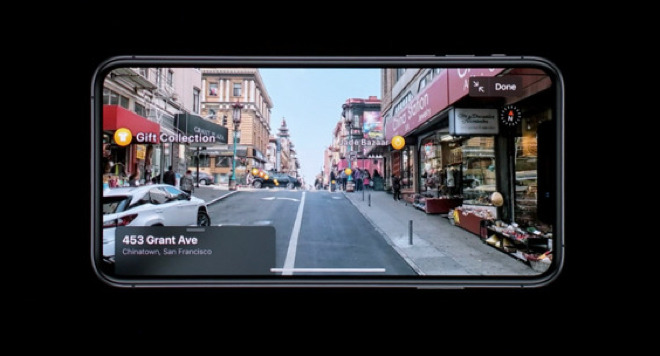
New features continue to be added to Maps, like the Look Around view in iOS 13. Similar to Google's Street View, Look Around provides street-level imagery for real-world navigation, but Apple's solution bakes in 3D frames and other graphical touches for a more interactive experience. Look Around is slowly rolling out in select metropolitan areas.
Apple was in large part spurred on to create a comprehensive mapping solution after the embarrassing launch of Maps in 2012, the company's first foray into the world of mapping after ditching most integrated Google services in iOS 6. Considered by some as a major blunder, Maps in iOS 6 was unreliable and incorporated incorrect data, while its signature feature — Flyover — suffered from graphical issues.
Criticism was so sharp that CEO Tim Cook issued an apology to customers frustrated by the dodgy software.
In addition to the broad Maps investment figure, Apple answered questions about its Safari web browser, App Store commission system and other issues, the report said. Further, two employees sought to move disputes to arbitration. The disputes in question were not specified.
The House Judiciary Committee requested data and material relating to potential anticompetitive conduct in September. Along with the aforementioned topics, the committee is seeking clarity on Apple's crackdown of parental control apps, third-party payment systems, default user apps and so-called "Sherlocking" of third-party apps.
Source: Appleinsider










