 NEWS
NEWS
Apple's Research App Launches With Heart, Women's Health, and Hearing Studies in United States
 11/15/2019
 4033
4033
Apple today announced it has released its Research app with three studies related to heart and movement, women's health, and hearing. The app is designed to make it easier for iPhone users to contribute to medical research. 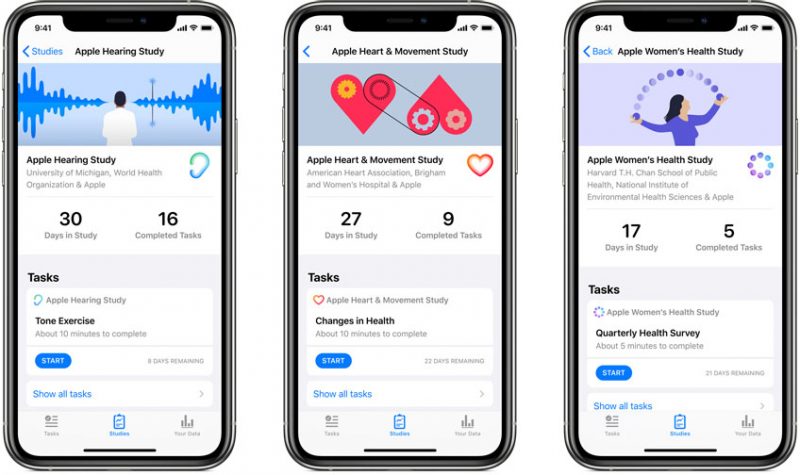
iPhone users in the United States can download the free Research app from the App Storeand enroll in the multi-year studies starting today. After enrolling in a study, participants using an iPhone or Apple Watch can contribute movement, heart rate, and noise level data captured during everyday activities.
Apple first previewed its Research app and the first three studies back in September:
- Apple Women's Health Study: In partnership with Harvard T.H. Chan School of Public Health and the NIH’s National Institute of Environmental Health Sciences (NIEHS), Apple has created the first long-term study of this scale focused on menstrual cycles and gynecological conditions. This study will inform screening and risk assessment of conditions like polycystic ovary syndrome (PCOS), infertility, osteoporosis, pregnancy and menopausal transition.
- Apple Heart and Movement Study: Apple is partnering with Brigham and Women’s Hospital and the American Heart Association on a comprehensive study of how heart rate and mobility signals — like walking pace and flights of stairs climbed — relate to hospitalizations, falls, heart health and quality of life in order to promote healthy movement and improved cardiovascular health.
- Apple Hearing Study: Alongside the University of Michigan, Apple is examining factors that impact hearing health. The Apple Hearing Health Study is the first of its kind to collect data over time in order to understand how everyday sound exposure can impact hearing. The study data will also be shared with the World Health Organization (WHO) as a contribution toward its Make Listening Safe initiative.
Apple COO Jeff Williams: Today marks an important moment as we embark on research initiatives that may offer incredible learnings in areas long sought after by the medical community. Participants on the Research app have the opportunity to make a tremendous impact that could lead to new discoveries and help millions lead healthier lives.
Apple emphasizes that the Research app was designed to only share data with the chosen studies when the user approves. An enrollment screen explains how data will be used and allows a user to control the type of data shared with each study. Apple says the data collected will never be sold to third parties.
Source: Macrumors










