 NEWS
NEWS
iPhone Buyers in U.S. More Than Twice as Likely to Own a Smartwatch as Android Buyers
 11/06/2019
 2568
2568
New data from Consumer Intelligence Research Partners indicates that 35 percent of iPhone buyers in the United States have a smartwatch, compared to just 16 percent of Android buyers. This suggests that iPhone users are more than twice as likely as Android users to purchase a smartwatch. 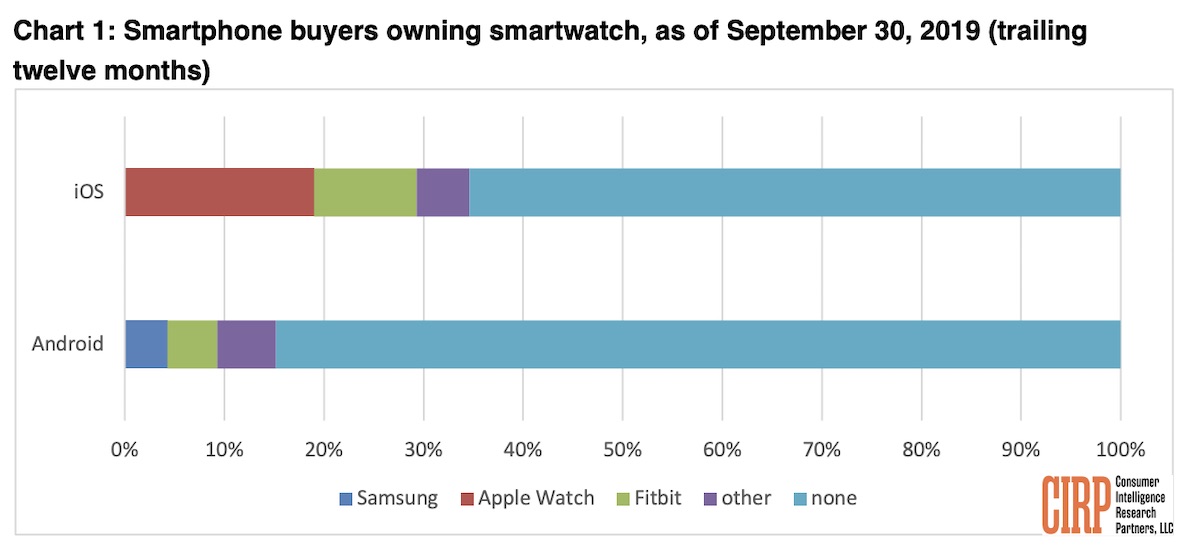
Within this percentage of iPhone owners in the U.S., 19 percent own the Apple Watch and 10 percent own a Fitbit. Android owners are more likely to own a Fitbit (5 percent) than a Samsung smartwatch (4 percent).
“Among the relatively small share of all smartphone buyers that have any kind of smartwatch, iPhone buyers are twice as likely to own one than Android buyers,” said Josh Lowitz, CIRP Partner and Co-Founder.
“Not surprisingly, Apple Watch is the leading smartwatch for iPhone buyers, while about half as many own a Fitbit. Until now, Fitbit was a neutral brand, but now becomes part of the Google-Android-Pixel-Nest universe. This creates an interesting new Android entry point into the Apple ecosystem, with a decent percentage of iPhone owners now using a wearable that becomes a more Android-friendly device. Also, among the small percentage of Android owners that have a smartwatch, Samsung and Fitbit have roughly equal shares.”
Google just announced its plan to acquire Fitbit for $2.1 billion, planning to release a new "Made by Google" wearables category that includes Fitbit devices.
For Apple, CEO Tim Cook recently stated that Apple set new fourth quarter revenue records for its wearables in every market, based on strong sales for Apple Watch and other devices like AirPods and Beats headphones.
CIRP based its findings on a survey of 500 mobile phone buyers in the United States, surveyed from September 29 through October 10, 2019. Those surveyed activated a mobile phone in the U.S. in the July to September 2019 period.
Source: MacRumors









