 NEWS
NEWS
Adobe 'All-In' on Photoshop for iPad, Illustrator for iPad Coming Next Year
 10/22/2019
 3228
3228
Following a recent Bloomberg report that Adobe continues to be committed to releasing the promised Photoshop CC for iPad app by the end of 2019, Daring Fireball's John Gruber has offered up some additional info on Adobe's plans.
Gruber says that Adobe is "all in" on photoshop for iPad, and that it's viewed as a "serious top-shelf project for creative professionals." 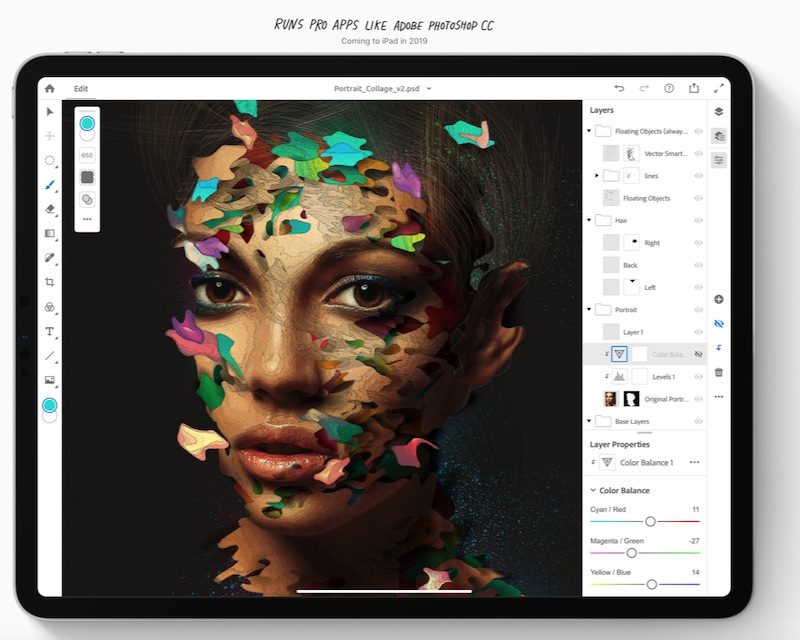
The team of engineers working on it has grown significantly from a year ago, and they have plans to add features iteratively on an aggressive schedule. It's reasonable to be disappointed that it isn't further along feature-count-wise, but anyone who cares about Photoshop for iPad as a long-term product should be very excited about its foundation, direction, and the attention Adobe is paying to the fine details of a touch-first Photoshop UI.
In response to reports that Photoshop for iPad beta testers are unhappy with limited and missing core Photoshop features, Gruber explains that Adobe is positioning the software as "real" Photoshop as it's built using the same code base that's used for the desktop version. That's been interpreted as a "full" version of Photoshop, which isn't quite correct.
Photoshop for iPad is real because it is using the same code base that's been running on the desktop for decades. That's an amazing technical accomplishment. Photoshop for iPad is not full -- and the initial release was never planned to be -- because it only exposes a subset of features from the desktop version.
Adobe first announced its plans to introduce an iPad version of Photoshop CC in October of 2018, promising it for release in 2019. Adobe has been testing the app with beta testers since May, but there's still no specific word on when it will launch.
Though it won't be a complete mirror of Photoshop on the desktop, the Photoshop CC app for iPad is designed to let users open and edit native PSD files for cross-platform functionality. Adobe is planning to add several features later, including rotate canvas, shapes/paths, custom brushes and fonts, color swatches, curve adjustment, smart objects, and grids and guides.
In a separate report released this afternoon, Bloomberg says that Adobe is also working on a version of Illustrator that will work on the iPad. Adobe is said to be planning to preview Illustrator for iPad at its Adobe MAX conference in November before releasing the app in 2020.
Source: Macrumors










