 NEWS
NEWS
Steve Jobs Proposed an Apple Card as far Back as 2004
 05/21/2019
 2759
2759
Apple co-founder Steve Jobs floated the idea of an Apple Card in 2004, though that incarnation would've been far different, according to one of the company's former creative directors.
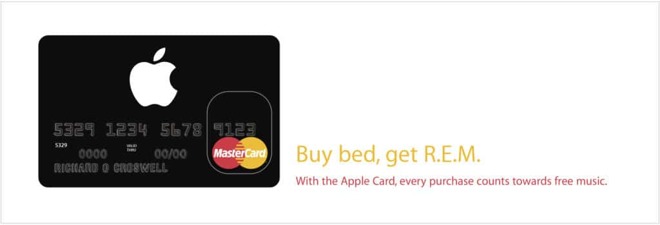
The card would've been purely physical and offered by Mastercard, Ken Segall revealed on Monday. And instead of cashback rewards, owners would've accrued "iPoints," usable for songs and albums on iTunes.
The project collapsed because Jobs couldn't secure the terms he wanted from Mastercard, Segall explained. By that point internal teams had already begun creating ads, each with a witty line based around popular bands.
"Buy bed, get R.E.M," said one. Some others included "Buy balloons, get Zeppelin," "Buy lipstick, get Kiss," and "Buy raincoat, get Weather Report."
Another card concocted by Jobs — with the help of original retail head Ron Johnson — was the short-lived Apple Pro Card. This offered a "world of benefits and privileges, designed exclusively for the professional Mac user," according to promo language. Segall noted that references to the Pro Card have all but disappeared from the internet, and that his "vague memory" is that it cost $99 per year.
Benefits were small, simply offering things like next-day Genius Bar appointments, early notification of upcoming deals, and free data migration to a PowerMac G5. There was also a special "Pro Day" at stores, offering 10% off software and free installation.
The modern Apple Card, coming to the U.S. sometime this summer, is primarily digital. Partners include Mastercard and Goldman Sachs.
Source: appleinsider










