 NEWS
NEWS
College Student Caught Trafficking Drugs Through iOS App
 02/22/2019
 2870
2870
A UC Santa Cruz student was indicted last week on charges of distribution and possession with intent to distribute cocaine and methamphetamine, business he allegedly conducted through an app made available on Apple's iOS App Store.
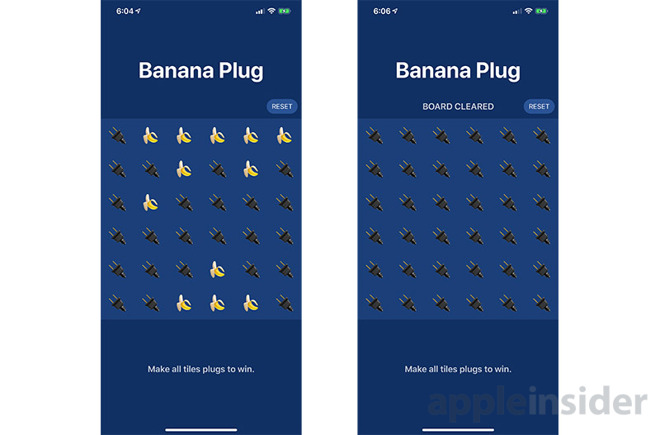
The "Banana Plug" app was allegedly used to distribute narcotics.
According to an affidavit filed by a Homeland Security Investigations agent, Collin Riley Howard, 18, developed the app "Banana Plug" to distribute narcotics and other contraband to local customers between Nov. 7 and Nov. 28, 2018.
The U.S. Attorney's Office for the Northern District of California made the indictment public in an announcement Tuesday.
Along with cocaine and methamphetamine, the app advertised "Molly" and "Shrooms," while customers were invited to make "special requests" for other controlled substances. UC Santa Cruz police were tipped off to the illicit app after finding posters publicizing "Banana Plug" to students at the UC Santa Cruz campus.
In a sting operation that followed, an undercover HSI agent used the app to request marijuana and cocaine. Subsequent Snapchat messages helped facilitate a total of four purchases, the third and fourth of which involved more than five grams of methamphetamine, according to the statement. Howard was arrested on Feb. 15, before payment for the fourth sale was tendered.
"Banana Plug," which remains available for download on the App Store as of this writing, is marketed as a game "involv[ing] bananas and plugs." Users tap tiles that alternate between images of bananas and electrical plugs, the goal being to clear the screen of all bananas.
How customers allegedly communicated with Howard is unknown, though those specific features might no longer be active in the app's most current version. "Banana Plug" was published to the App Store last October and was updated twice, most recently in November. The app's name appears to reference the college's mascot, the Banana Slug, and the street term "plug," which is typically used to describe a drug dealer.
"We Have What You Want," the app's teaser reads.
The statement does not make clear how the app passed through Apple's review process, nor does it specify whether Apple was made aware of the app's nefarious nature prior to or following Howard's arrest. As noted in section 1.4.3 of Apple's App Review Guidelines, software like "Banana Plug" is strictly prohibited from distribution on the App Store.
Apps that encourage consumption of tobacco products, illegal drugs, or excessive amounts of alcohol are not permitted on the App Store. Apps that encourage minors to consume any of these substances will be rejected. Facilitating the sale of marijuana, tobacco, or controlled substances (except for licensed pharmacies) isn't allowed.
Apple did not immediately respond to a request for comment.
Masquerading as an innocuous game, "Banana Plug" most likely snuck past Apple's stringent review protocols and onto the App Store, where it remained undetected for a month.
Howard faces a maximum 20 years in prison and a fine of $1,000,000 for each of two counts of distribution and possession with intent to distribute cocaine and methamphetamine. On two concurrent counts of possession with intent to distribute more than five grams of methamphetamine, Howard could serve a minimum 5 years in prison and a maximum of 40 years in prison, and a fine of $5,000,000 each.
Source: appleinsider










