 NEWS
NEWS
Singapore Airlines Goes all-in on iPads for Pilot Flight books
 11/23/2018
 2578
2578
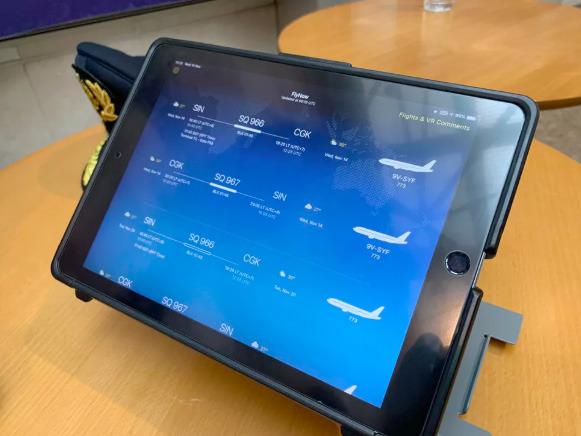
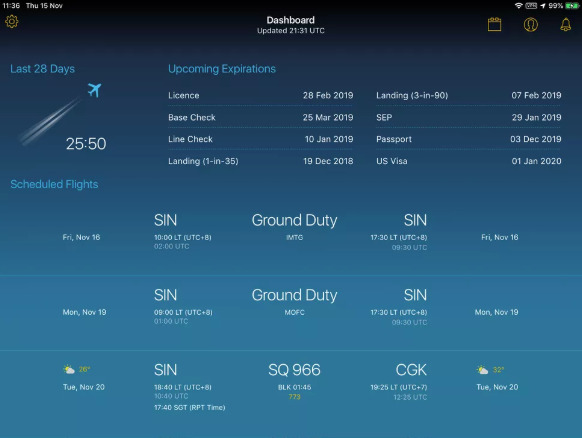
Going beyond flight charts and weather forecasts, the company has for years been loading pilots' iPads with two custom-built apps, FlyNow and Roster, according to CNET. The former provides data on things like weather, routes, and fuel. Roster offers a glance at flight hours, upcoming flights, and expiration dates for licenses, passports, and visas.
The second app is said to be particularly significant, since pilots previously had to track hours and visa dates on their own. Without a visa pilots can't fly to the U.S., which can potentially force the company to hunt for last-minute substitutes.
Since the iPads use Touch ID, pilots can also forego two-factor authentication dongles.
Many airlines have to turned to iPads or other tablets in order to eliminate bulky flight bags full of charts and other paperwork. In some cases they've even used iPads to replace in-flight entertainment systems, or counted on passengers to use their on smartphones and tablets. Ditching flight bags and/or conventional entertainment systems can lower the weight of a plane, cutting down on the high cost of aviation fuel.
Singapore Airlines is actually a relative latecomer in the industry, having kickstarted its iPad program in 2015. The first major U.S. airline to make the switch was Alaska Airlines back in 2011.
The former is currently working on upgrading older cockpits with USB ports to charge iPads. It's also hoping to add secure, in-flight internet connections for pilots, which would allow tablets to get live updates rather than depend on data loaded before takeoff.
Source: appleinsider










