 NEWS
NEWS
New iOS Passcode Bypass Found Just Hours After iOS 12.1 Release
 10/31/2018
 5699
5699
A couple of hours after Apple released security fixes for the passcode bypasses in iOS 12, the iOS enthusiast and hobbyist hacker Jose Rodriguez found another passcode bypass bug in iOS 12.1 that uses Group FaceTime to get access to the contacts list.
As detailed in a video uploaded on YouTube, the passcode bypass bug can be exploited by either receiving a call or asking Siri to make one for you and changing the call to FaceTime.
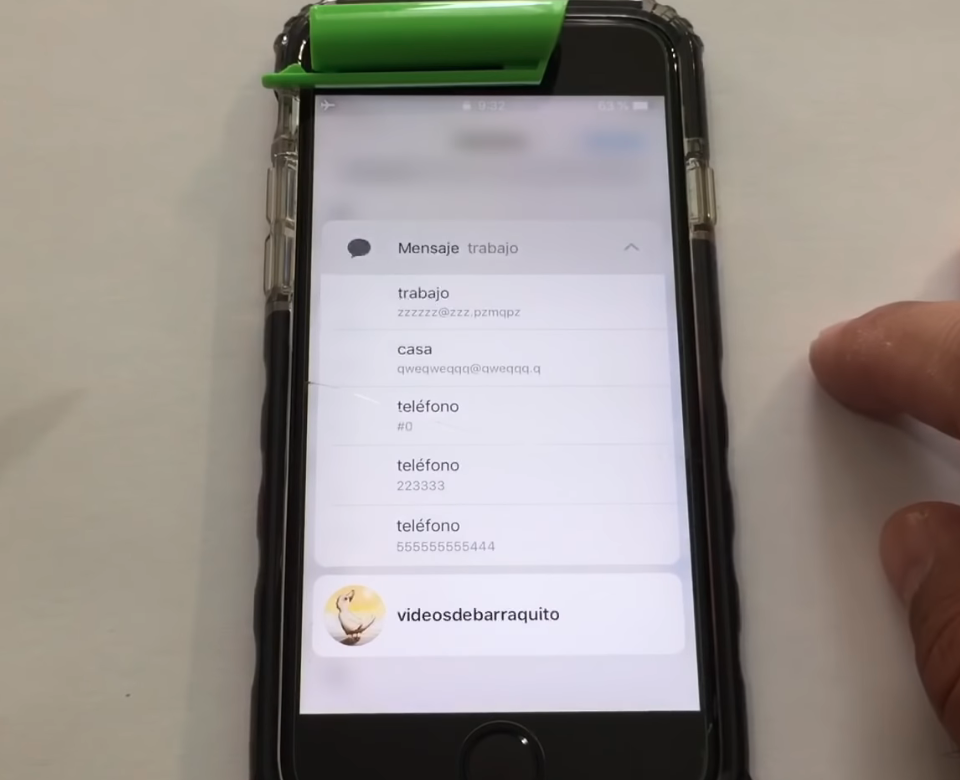
Once switched to a FaceTime call, you can access the iPhone's full contacts list by going to the bottom right menu and tapping "Add Person" although the device is still locked.
Furthermore, you can view extra information for every contact in the address book using the iOS 3D Touch feature after you get access to the contacts list, and you can also initiate new phone calls.
"In a passcode-locked iPhone with latest iOS released today Tuesday, you receive a phone call, or you ask Siri make a phone call (can be digit by digit), and, by changing the call to FaceTime you can access to the contact list while adding more people to the Group FaceTime, and by doing 3D Touch on each contact you can see more contact information," told Rodriguez to The Hacker News.
The new passcode bypass allows attackers to access the contacts list on a locked iPhone and to make calls
According to Rodriguez, the new passcode bypass bug he found works on all iPhone models with support for Apple's Group FaceTime, added in the iOS 12.1 release.
It is also important to mention that the passcode bypass issue Rodriguez has found in the iOS 12.1 release can be easily mitigated by disabling Siri on the home screen.
Here is the video of the previously passcode bypass iOS 12 (1-Call).









