 NEWS
NEWS
Apple’s Content Filter for Kids is still Letting Pornographic and Violent Search Results Through
 10/19/2018
 2602
2602
Apple’s parental controls in iOS 12 are rather inconsistent: certain sex-related terms are blocked, but other troubling results — such as alt-right websites and support for terrorism — are allowed, sex education site O.school spotted.
The settings are found under Screen Time, which Apple introduced last month in iOS 12. Using Screen Time, parents can set an iPhone to hide inappropriate content from children. But according to O.school’s findings, and as confirmed by The Verge, the filter doesn’t allow for searches like “safe sex,” “sex assault hotline,” and “sex education,” but it does allow searches for bombing, poisoning, and even joining a terrorist group. (Results for “sexual assault hotline” are still shown.) Apple simply bans sites that mention sex, and it hasn’t expanded its restricted terms to violence, extremism, or even more specific pornography terms. For instance, certain pornographic subreddits are still searchable, and searching for “how do I jerk off” produces results, while “female masturbation” doesn’t.
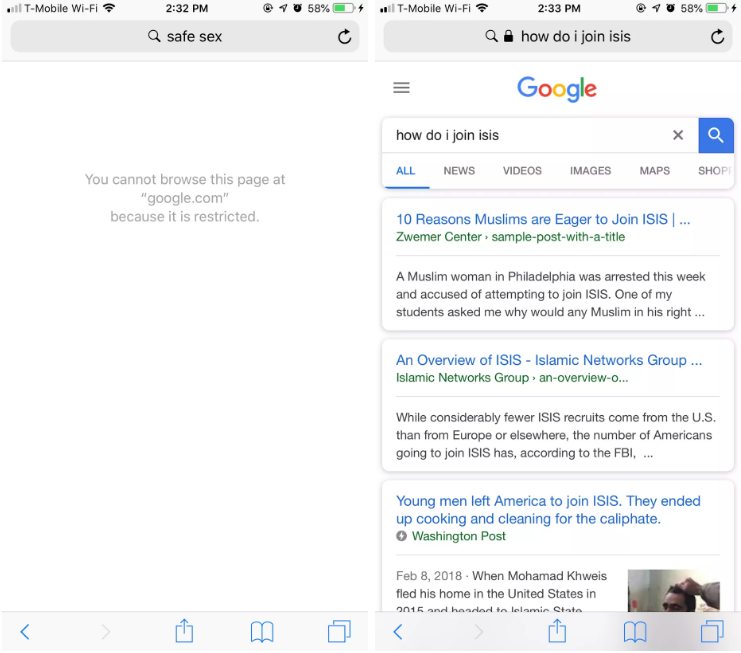
Despite Apple’s faulty word-based filter, with enough careful selection and thought, teens could hypothetically pull up their intended results. But as it stands, the filter does a very poor job of keeping out actual inappropriate content, such as the neo-Nazi news site the Daily Stormer, and it’s improperly censoring certain websites, such as Teen Vogue. We’ve reached out to Apple for comment.
To see what’s censored for yourself, you can head into Screen Time, then tap Content & Privacy Restrictions, opt in, and then tap on Content Restrictions. Scroll down to Web Content and tap Limit Adult Websites. Apple also gives parents the option to only let kids visit allowed websites and to blacklist certain sites, which seems like the better alternative to using the adult websites filter.
Source: the verge










