
NEWS

Users Spending Hours on Their Smartphone, But They're Using Them Like a PC, not a Phone

10/16/2018

2128

Users spending hours on their smartphone, but they're using them like a PC, not a phone

Users Spending Hours on Their Smartphone, But They're Using Them Like a PC, not a Phone


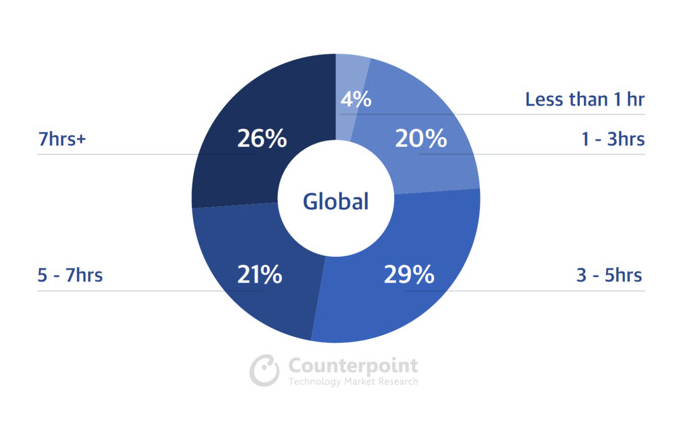
Nearly half of smartphone users report spending more than five hours a day on their phone, with one in four reporting more than seven hours per day. But rather than making calls all day, smartphone users are primally using them as mobile PCs —browsing the web and playing games.


A report by Counterpoint Research noted a variety of behavior patterns emerging from how users describe their phone use. One of the most solid takeaways is that "smartphones" aren't primarily being used as phones. 


In fact, the most dedicated users were described as "mostly running businesses on their phones or consuming digital content for long hours." 


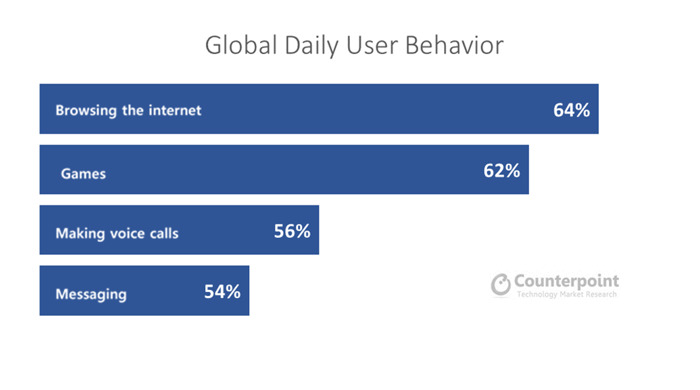
The survey noted that 64 percent of users reported using their phones daily to access websites, while 62 percent reported playing games. But just 56 percent cited "making phone calls" as a primary use case of their devices. Another 54 percent cited text messaging. 


While these usage figures are self-reported by users, rather than being actual analytics data collected scientifically, the results mirror several shifts in the mobile industry that have occurred since Apple entered with the iPhone in 2007.
 

Users Spending Hours on Their Smartphone, But They're Using Them Like a PC, not a Phone


Source: appleinsider

Windows
Mac OS
iOS
Linux
3uTools
Win 64-bit For this device
V9.0 2025-11-11
Download
Win 32-bit For this device
V9.0 2025-11-11
Download
3uTools V3.18
2025-09-18
Please use the 3uTools PC client to install the iOS client:
1、 Install either the Windows or Mac version of 3uTools on your computer
2、 Open the PC client and connect your device to the computer via USB cable
3、 After the connection is successful, wait for the computer to automatically install the mobile app for the device, or locate “Install Mobile App” on the computer and manually click to install.
3uTools
deb file
V3.01 2025-11-20
Download
rpm file
V3.01 2025-11-20
Download
Windows
Windows
iOS
iOS
Android
Android
TV
TV
3uAirPlayer
Win 64-bit For this device
V6.0.2 2025-11-19
Download
Win 32-bit For this device
V6.0.2 2025-11-19
Download
iOS Device Mirroring (No App Required)
1、 Install 3uAirPlayer on the Windows PC
2、 Open Control Center and select Screen Mirroring
3、 From the list, choose your PC to start mirroring
4、 Or connect your iOS device to the PC via USB to begin mirroring
Scan to get "3uAirPlayer" App
3uAirPlayer TV V1.0.18
2025-11-28
TV System Requirements: Android 7.0 or later
Download the TV installation package, copy it to a USB drive, insert it into your TV or set-top box, then select the file from the home screen to install.





