
NEWS

Someone Recreated Apple’s New Campus with 85,000 LEGO Bricks

10/09/2018

2936

2018 has been a good year for ridiculous, gargantuan LEGO builds. Just weeks ago, there was that life-size, driveable LEGO Bugatti.


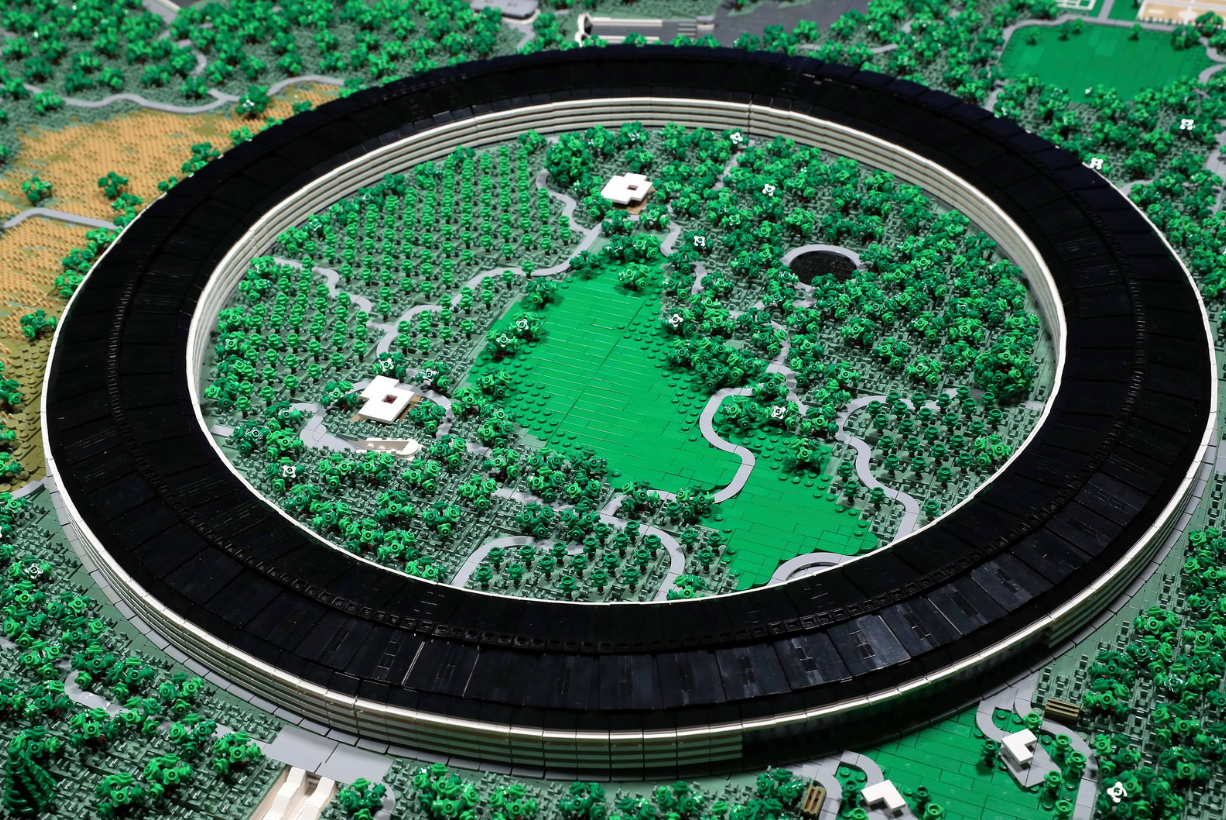
Now someone has gone and built a mega-sized recreation of Apple ’s new Cupertino “spaceship” campus — otherwise known as Apple Park.

 Someone Recreated Apple’s New Campus with 85,000 LEGO Bricks


Coming in at roughly 85,000 pieces, the build took designer Spencer_R a little over two years to complete, with many of those hours spent poring over drone footage of the campus’ construction. At 6.8 x 4.5 feet, it’s bigger than most kitchen tables. Spencer says it weighs around 78 pounds.


Beyond the massive circular building that serves as the build’s primary feature, tons and tons of tiny details accent the brick canvas: its got the glass-walled Steve Jobs Theater, the hundred-year-old Glendenning Barn that was disassembled and rebuilt on the property, the employee parking garages, the visitor center and even some tiny employee basketball/tennis courts for good measure.


 Someone Recreated Apple’s New Campus with 85,000 LEGO Bricks


Oh, and trees. Lots and lots and lots of trees; 1,646 trees in all, by Spencer’s count.


This is hardly Spencer’s first time recreating a mega building — he’s done custom creations of everything from the Eiffel Tower to Rockefeller Center. With that said, he notes that Apple Park is “nearly as large as all of [his] other LEGO skyscraper builds combined.”


For more build details, you can tap through Spencer_R’s gallery/build notes here


Source: techcrunch


Windows
Mac OS
iOS
Linux
3uTools
Win 64-bit For this device
V9.01 2025-12-27
Download
Win 32-bit For this device
V9.01 2025-12-27
Download
3uTools
Intel Chip How to Identify Chip Type
V9.0 2025-12-02
Download
Apple Silicon
V9.0 2025-12-02
Download
How to Identify Chip Type
1.  Click the Apple icon in the top-left corner of the screen and select About This Mac.
2.  Check the Processor or Chip field to determine if it is "Intel" or "Apple".
Please use the 3uTools PC client to install the iOS client:
1、 Install either the Windows or Mac version of 3uTools on your computer
2、 Open the PC client and connect your device to the computer via USB cable
3、 After the connection is successful, wait for the computer to automatically install the mobile app for the device, or locate “Install Mobile App” on the computer and manually click to install.
3uTools
deb file
V3.01 2025-11-20
Download
rpm file
V3.01 2025-11-20
Download
Windows
Windows
iOS
iOS
Android
Android
TV
TV
3uAirPlayer
Win 64-bit For this device
V6.0.2 2025-11-19
Download
Win 32-bit For this device
V6.0.2 2025-11-19
Download
iOS Device Mirroring (No App Required)
1、 Install 3uAirPlayer on the Windows PC
2、 Open Control Center and select Screen Mirroring
3、 From the list, choose your PC to start mirroring
4、 Or connect your iOS device to the PC via USB to begin mirroring
Scan to get "3uAirPlayer" App
3uAirPlayer TV V1.0.18
2025-11-28
TV System Requirements: Android 7.0 or later
Download the TV installation package, copy it to a USB drive, insert it into your TV or set-top box, then select the file from the home screen to install.





