NEWS

Apple Said to be Working on Fixing 'Aggressive' Skin Smoothing in iPhone XS Photos

09/29/2018

2365

Apple Said to be Working on Fixing 'Aggressive' Skin Smoothing in iPhone XS Photos


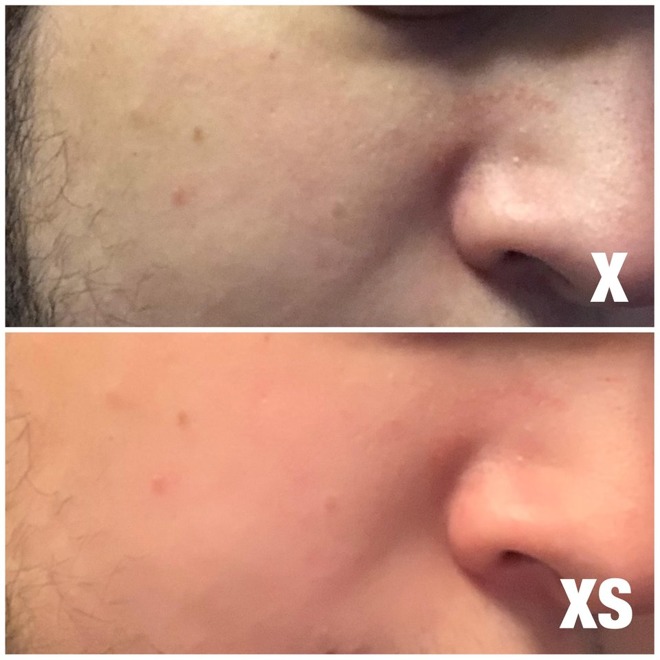
The problem can be seen in photos shared on Reddit, and multiple threads on the site have described Apple's processing as looking like "really poor Photoshopping," "a Snapchat filter," or a "beauty filter." In some instances a person's skin may change to an unnatural color.

AppleInsider has confirmed with sources not authorized to speak on behalf of the company that Apple is looking into the situation. At the same time, we have been told that the effect is not applied universally. It has not manifested on any of the iPhone XS devices that AppleInsider has purchased for review or personal use.

Intelligent photo processing is one of Apple's major bulletpoints for 
the XS. The phone joins a custom image signal processor with the A12 chip's Neural Engine to enhance photos both before and after shooting, for instance through facial landmarking and Smart HDR.

At present, there isn't any commonality in skin tone or features in the examples to suggest that any one variable is responsible for the effect. Based on the images provided, it appears that the issue is in software, and not hardware, and should be rectifiable with a patch to iOS.


Source: appleinsider

Windows
Mac OS
iOS
Linux
3uTools
Win 64-bit For this device
V9.0 2025-11-11
Download
Win 32-bit For this device
V9.0 2025-11-11
Download
3uTools
Intel Chip How to Identify Chip Type
V9.0 2025-12-02
Download
Apple Chip
V9.0 2025-12-02
Download
How to Identify Chip Type
1.  Click the Apple icon in the top-left corner of the screen and select About This Mac.
2.  Check the Processor or Chip field to determine if it is "Intel" or "Apple".
Please use the 3uTools PC client to install the iOS client:
1、 Install either the Windows or Mac version of 3uTools on your computer
2、 Open the PC client and connect your device to the computer via USB cable
3、 After the connection is successful, wait for the computer to automatically install the mobile app for the device, or locate “Install Mobile App” on the computer and manually click to install.
3uTools
deb file
V3.01 2025-11-20
Download
rpm file
V3.01 2025-11-20
Download
Windows
Windows
iOS
iOS
Android
Android
TV
TV
3uAirPlayer
Win 64-bit For this device
V6.0.2 2025-11-19
Download
Win 32-bit For this device
V6.0.2 2025-11-19
Download
iOS Device Mirroring (No App Required)
1、 Install 3uAirPlayer on the Windows PC
2、 Open Control Center and select Screen Mirroring
3、 From the list, choose your PC to start mirroring
4、 Or connect your iOS device to the PC via USB to begin mirroring
Scan to get "3uAirPlayer" App
3uAirPlayer TV V1.0.18
2025-11-28
TV System Requirements: Android 7.0 or later
Download the TV installation package, copy it to a USB drive, insert it into your TV or set-top box, then select the file from the home screen to install.