NEWS

Apple Offering New AppleCare Monthly Plans Along with Theft and Loss Option

09/17/2018

3130

Apple Offering New AppleCare Monthly Plans Along with Theft and Loss Option


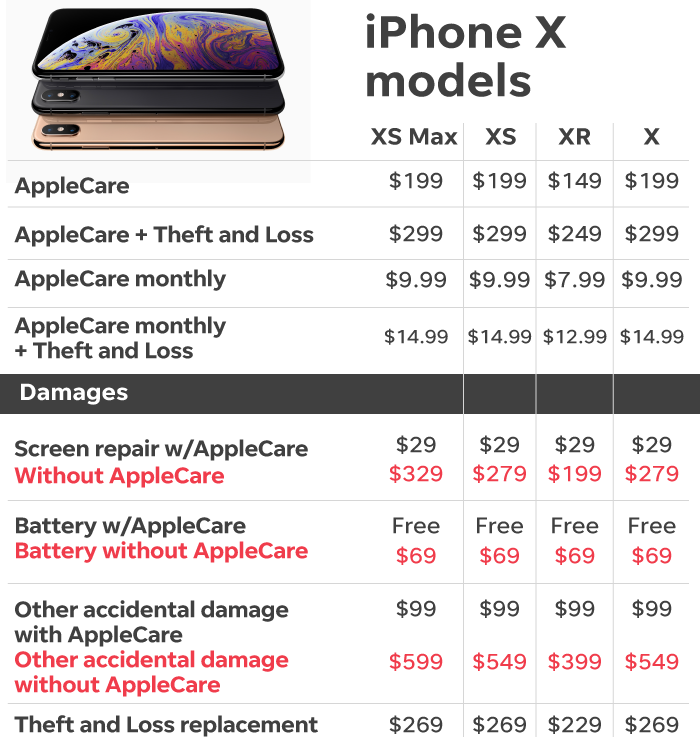
According to Apple's dedicated AppleCare website, the new AppleCare+ with Theft and Loss product covers up to two incidents of accidental damage, theft or loss, each of which is subject to its own schedule of deductibles. 

For instances of theft or loss, subscribers have to pay $199 to replace an iPhone 8, iPhone 7, iPhone 6S or iPhone 6. That fee jumps to $229 for iPhone XR, iPhone 8 Plus, iPhone 7 Plus, iPhone 6S Plus and iPhone 6 Plus, while top-of-the-line iPhone XS, iPhone XS Max and iPhone X replacements cost $269 each. 

The Theft and Loss package includes the same $29 and $99 fees for screen damage and accidental damage, respectively. Both tiers provide up to two years of Apple Support access, including software support, and eligibility for express hardware replacement. 

As can be expected, the new AppleCare+ tier is a bit more expensive than Apple's longstanding AppleCare+ plan — 50 percent more expensive to be exact. New iPhone owners will have to shell out monthly payments of $14.99 for up to 24 months or a lump sum of $299, up from $9.99 per month and $199 for the original AppleCare+ plan. 


Source: appleinsider

Windows
Mac OS
iOS
Linux
3uTools
Win 64-bit For this device
V9.0 2025-11-11
Download
Win 32-bit For this device
V9.0 2025-11-11
Download
3uTools
Intel Chip How to Identify Chip Type
V9.0 2025-12-02
Download
Apple Chip
V9.0 2025-12-02
Download
How to Identify Chip Type
1.  Click the Apple icon in the top-left corner of the screen and select About This Mac.
2.  Check the Processor or Chip field to determine if it is "Intel" or "Apple".
Please use the 3uTools PC client to install the iOS client:
1、 Install either the Windows or Mac version of 3uTools on your computer
2、 Open the PC client and connect your device to the computer via USB cable
3、 After the connection is successful, wait for the computer to automatically install the mobile app for the device, or locate “Install Mobile App” on the computer and manually click to install.
3uTools
deb file
V3.01 2025-11-20
Download
rpm file
V3.01 2025-11-20
Download
Windows
Windows
iOS
iOS
Android
Android
TV
TV
3uAirPlayer
Win 64-bit For this device
V6.0.2 2025-11-19
Download
Win 32-bit For this device
V6.0.2 2025-11-19
Download
iOS Device Mirroring (No App Required)
1、 Install 3uAirPlayer on the Windows PC
2、 Open Control Center and select Screen Mirroring
3、 From the list, choose your PC to start mirroring
4、 Or connect your iOS device to the PC via USB to begin mirroring
Scan to get "3uAirPlayer" App
3uAirPlayer TV V1.0.18
2025-11-28
TV System Requirements: Android 7.0 or later
Download the TV installation package, copy it to a USB drive, insert it into your TV or set-top box, then select the file from the home screen to install.