
NEWS

Benjamin Geskin Has Disclosed That the Leaked iOS Devices are Real

09/11/2018

2683

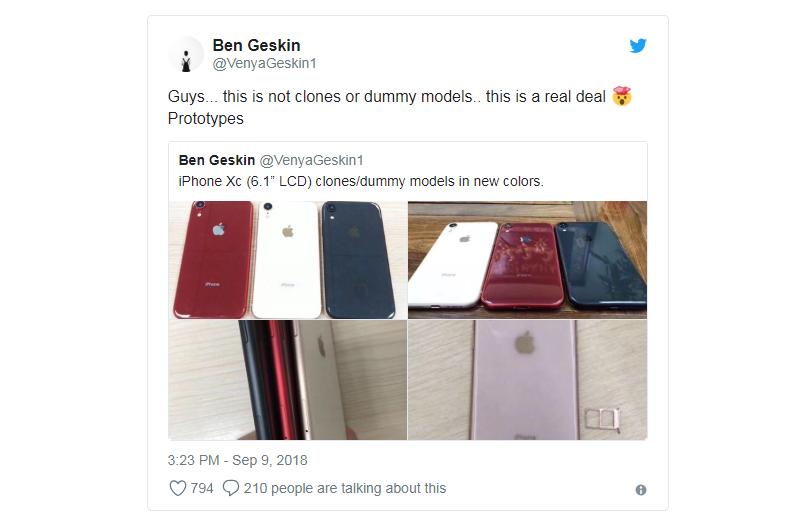
Noted device leaker Benjamin Geskin has shared a quartet of images, showing off Apple's forthcoming LCD iPhone Xc, with three colors on display.


As we reported before:  Dummy LCD iPhone Photos Leak in New Colors


iPhone Xc enclosures, photo credit Benjamin Geskin

 Benjamin Geskin Has Disclosed That the Leaked iOS Devices are Real


Slashleaks first shared the images on Sept. 6, suggesting that they were "clones" of Apple's forthcoming LCD iPhone. However, in a tweet on Sunday morning, Geskin disclosed that he believes that the devices are the real thing, and are some form of Apple prototype.


This is the second time in a day that the name "iPhone Xc" for Apple's lower-cost LCD-equipped iPhone expected to be announced on Sept 12. has popped up. The first time, it was spotted on Chinese social media, allegedly included in a China Mobile presentation about the new devices.


The LCD model has been long rumored to launch in different colors. Ming-Chi Kuo predicted in July that the device would ship potentially ship in gray, white, blue, red, and orange case colors.


Apple's "Gather round" event on Sept. 12 will put all the rumors to rest. Beyond just a new trio of iPhones, the event may see a refresh of the iPad Pro, and possibly new Macs.


Source: appleinsider

Windows
Mac OS
iOS
Linux
3uTools
Win 64-bit For this device
V9.01 2025-12-27
Download
Win 32-bit For this device
V9.01 2025-12-27
Download
3uTools
Intel Chip How to Identify Chip Type
V9.0 2025-12-02
Download
Apple Silicon
V9.0 2025-12-02
Download
How to Identify Chip Type
1.  Click the Apple icon in the top-left corner of the screen and select About This Mac.
2.  Check the Processor or Chip field to determine if it is "Intel" or "Apple".
Please use the 3uTools PC client to install the iOS client:
1、 Install either the Windows or Mac version of 3uTools on your computer
2、 Open the PC client and connect your device to the computer via USB cable
3、 After the connection is successful, wait for the computer to automatically install the mobile app for the device, or locate “Install Mobile App” on the computer and manually click to install.
3uTools
deb file
V3.01 2025-11-20
Download
rpm file
V3.01 2025-11-20
Download
Windows
Windows
iOS
iOS
Android
Android
TV
TV
3uAirPlayer
Win 64-bit For this device
V6.0.2 2025-11-19
Download
Win 32-bit For this device
V6.0.2 2025-11-19
Download
iOS Device Mirroring (No App Required)
1、 Install 3uAirPlayer on the Windows PC
2、 Open Control Center and select Screen Mirroring
3、 From the list, choose your PC to start mirroring
4、 Or connect your iOS device to the PC via USB to begin mirroring
Scan to get "3uAirPlayer" App
3uAirPlayer TV V1.0.18
2025-11-28
TV System Requirements: Android 7.0 or later
Download the TV installation package, copy it to a USB drive, insert it into your TV or set-top box, then select the file from the home screen to install.




