
NEWS

iPhone X Resale Value Jumps to Record 68 Percent Ahead of Apple's September 12 Event

09/07/2018

3252

Liquidation specialist B-Stock reported back in July that the average resale value of an iPhone X was 85% of the full retail price, a record for any iPhone at that point in the sales cycle.


A tech trade-in site says that today’s trade-in value is still 68% of the original sales price even a week before this year’s models are revealed, in strong contrast to one of Samsung’s flagship phones …


With the latest report suggesting that this year’s iPhone X successor, expected to be called the XS or Xs, could start from $800, that could represent an opportunity for a very cheap upgrade to the new model if you have a spare phone you could use to span the gap.


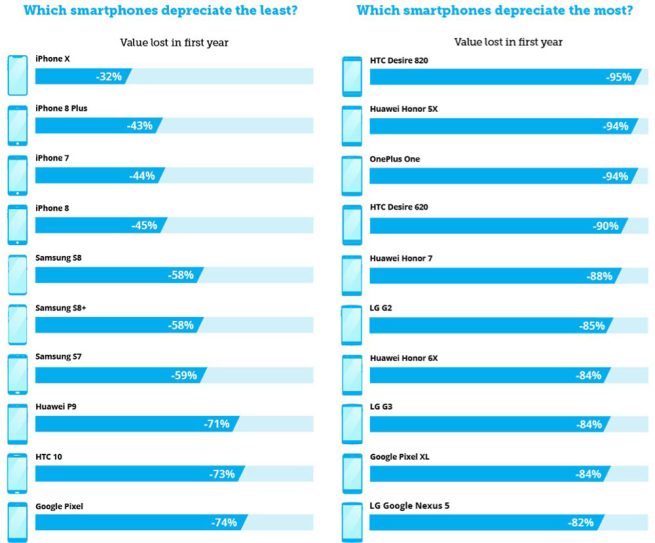
In fact, says Music Magpie, all iPhone models hold their value better than any of the competition. The iPhone X has depreciated 32%, the iPhone 8 Plus by 43%, the iPhone 8 45% and the iPhone 7 by 44%. This is in sharp contrast to Samsung’s Galaxy S9+, which has already lost almost half its value just five months after launch.


Other Samsung models have depreciated by between 58% and 59%, with even worse news for other brands – as shown below.


iPhone X Resale Value Jumps to Record 68 Percent Ahead of Apple's September 12 Event


The worst purchase of all was the HTC Desire 820, which lost 95% of its value in one year.


Source: 9to5mac

Windows
Mac OS
iOS
Linux
3uTools
Win 64-bit For this device
V9.01 2025-12-27
Download
Win 32-bit For this device
V9.01 2025-12-27
Download
3uTools
Intel Chip How to Identify Chip Type
V9.0 2025-12-02
Download
Apple Silicon
V9.0 2025-12-02
Download
How to Identify Chip Type
1.  Click the Apple icon in the top-left corner of the screen and select About This Mac.
2.  Check the Processor or Chip field to determine if it is "Intel" or "Apple".
Please use the 3uTools PC client to install the iOS client:
1、 Install either the Windows or Mac version of 3uTools on your computer
2、 Open the PC client and connect your device to the computer via USB cable
3、 After the connection is successful, wait for the computer to automatically install the mobile app for the device, or locate “Install Mobile App” on the computer and manually click to install.
3uTools
deb file
V3.01 2025-11-20
Download
rpm file
V3.01 2025-11-20
Download
Windows
Windows
iOS
iOS
Android
Android
TV
TV
3uAirPlayer
Win 64-bit For this device
V6.0.2 2025-11-19
Download
Win 32-bit For this device
V6.0.2 2025-11-19
Download
iOS Device Mirroring (No App Required)
1、 Install 3uAirPlayer on the Windows PC
2、 Open Control Center and select Screen Mirroring
3、 From the list, choose your PC to start mirroring
4、 Or connect your iOS device to the PC via USB to begin mirroring
Scan to get "3uAirPlayer" App
3uAirPlayer TV V1.0.18
2025-11-28
TV System Requirements: Android 7.0 or later
Download the TV installation package, copy it to a USB drive, insert it into your TV or set-top box, then select the file from the home screen to install.




