NEWS

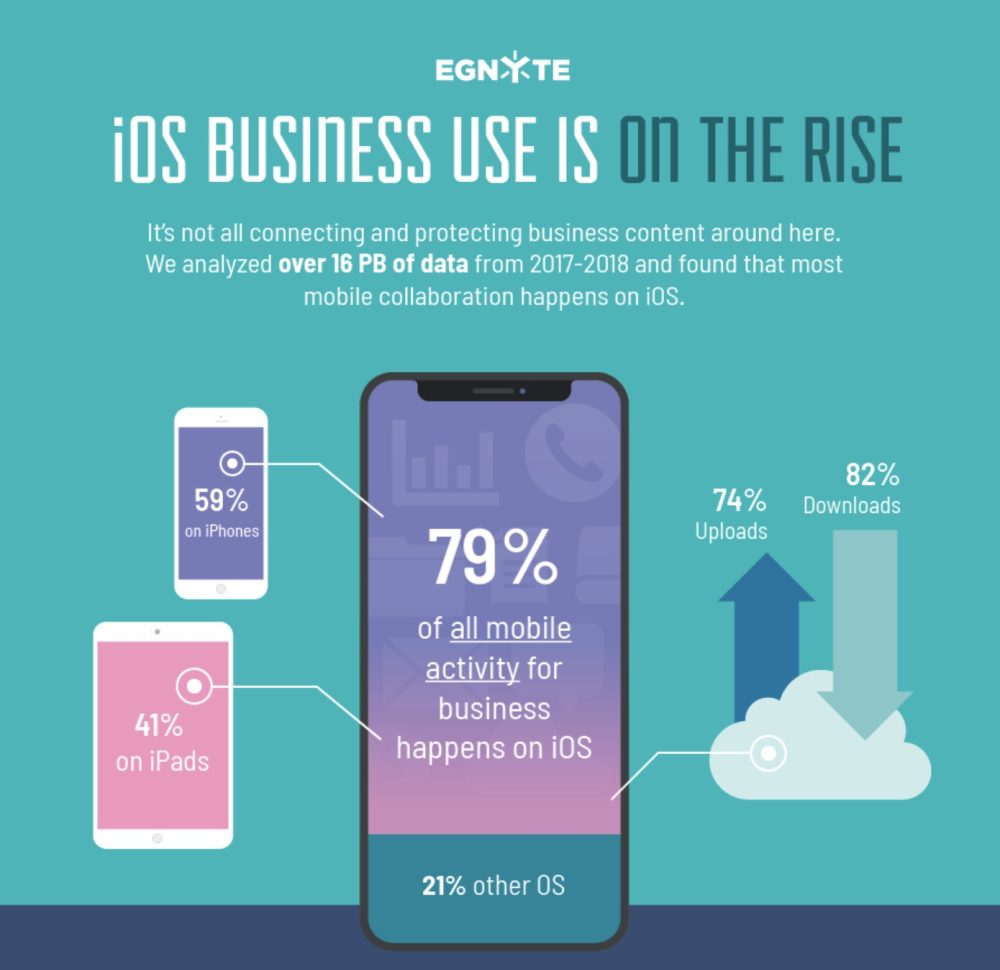
iOS Dominating Enterprise with 79% of Mobile Business Use Coming from iPhone and iPad

09/05/2018

2401

New research from the data protection and file sharing company, Egnyte, is shedding more light on iOS use in the enterprise market. While Apple is still a minor player when it come desktops in business, it has become the clear leader for mobile devices with iPhone and iPad. We’ve also got a look at the most popular devices from iOS, Android, to Surface.


Egnyte crunched the numbers on over 16 petabytes (1,600TB) of data from 2017-2018 to look at the latest trends of desktop and mobile computing in business. Microsoft is still dominating when it comes to desktops with 91% of business use coming from Windows, with the remaining 9% coming from macOS.


However, Apple is the clear leader when it comes to mobile use, with Egnyte’s data showing 79% coming from iOS, with almost 60% happening on iPhone.


As for the most used hardware looking at iOS, Android, and Surface devices, iPhone and iPad dominated the top five:

  • iPhone 7

  • iPhone 6s

  • iPad Air 2

  • iPhone 7 Plus

  • iPhone 6


iOS Dominating Enterprise with 79% of Mobile Business Use Coming from iPhone and iPad


Egnyte notes that iPad Pro, iPhone 8, and iPhone X are all in the top 20. It makes sense though that Apple’s more affordable devices would be used more, particularly when businesses are upgrading devices more slowly than a consumer would for personal devices.
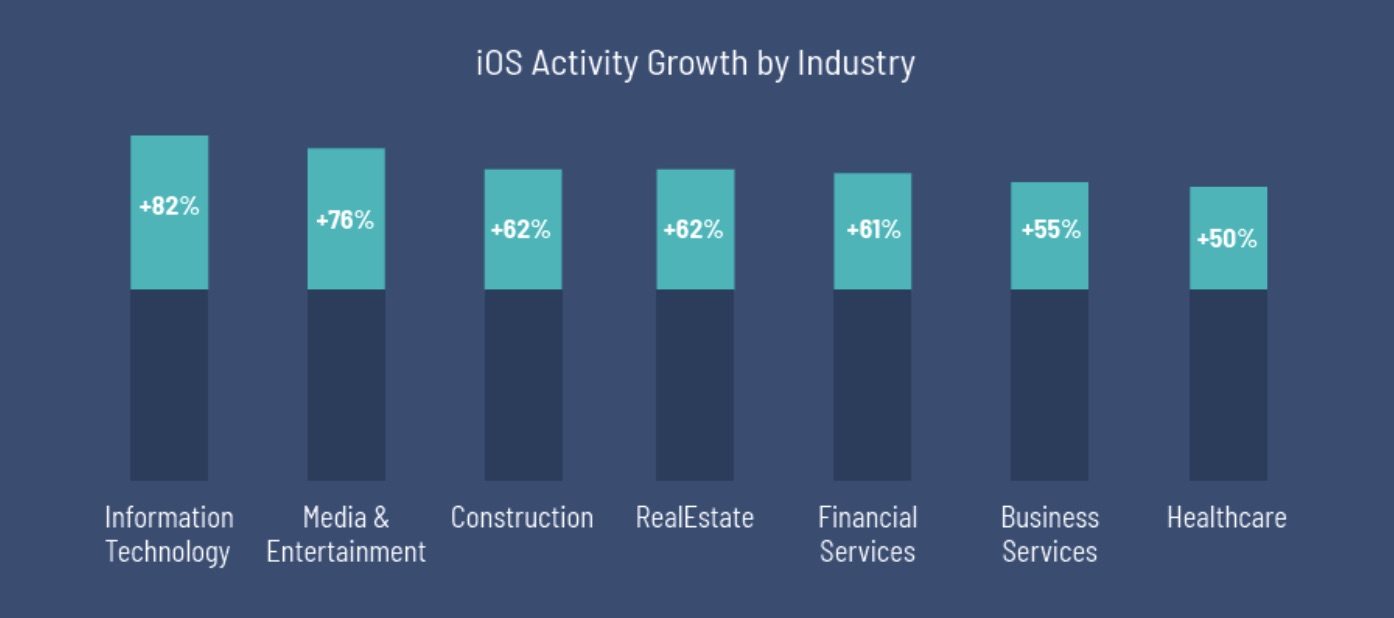

iOS Dominating Enterprise with 79% of Mobile Business Use Coming from iPhone and iPad


More good news for Apple is the growth of iOS in business since 2017. The report notes seven industries with over 50% growth of iOS use, with IT seeing an 82% increase.


Source: 9to5mac

Windows
Mac OS
iOS
Linux
3uTools
Win 64-bit For this device
V9.0 2025-11-11
Download
Win 32-bit For this device
V9.0 2025-11-11
Download
3uTools
Intel Chip How to Identify Chip Type
V9.0 2025-12-02
Download
Apple Chip
V9.0 2025-12-02
Download
How to Identify Chip Type
1.  Click the Apple icon in the top-left corner of the screen and select About This Mac.
2.  Check the Processor or Chip field to determine if it is "Intel" or "Apple".
Please use the 3uTools PC client to install the iOS client:
1、 Install either the Windows or Mac version of 3uTools on your computer
2、 Open the PC client and connect your device to the computer via USB cable
3、 After the connection is successful, wait for the computer to automatically install the mobile app for the device, or locate “Install Mobile App” on the computer and manually click to install.
3uTools
deb file
V3.01 2025-11-20
Download
rpm file
V3.01 2025-11-20
Download
Windows
Windows
iOS
iOS
Android
Android
TV
TV
3uAirPlayer
Win 64-bit For this device
V6.0.2 2025-11-19
Download
Win 32-bit For this device
V6.0.2 2025-11-19
Download
iOS Device Mirroring (No App Required)
1、 Install 3uAirPlayer on the Windows PC
2、 Open Control Center and select Screen Mirroring
3、 From the list, choose your PC to start mirroring
4、 Or connect your iOS device to the PC via USB to begin mirroring
Scan to get "3uAirPlayer" App
3uAirPlayer TV V1.0.18
2025-11-28
TV System Requirements: Android 7.0 or later
Download the TV installation package, copy it to a USB drive, insert it into your TV or set-top box, then select the file from the home screen to install.