 NEWS
NEWS
Apple Autonomous Test Vehicle Involved in Accident on August 24
 09/03/2018
 2927
2927
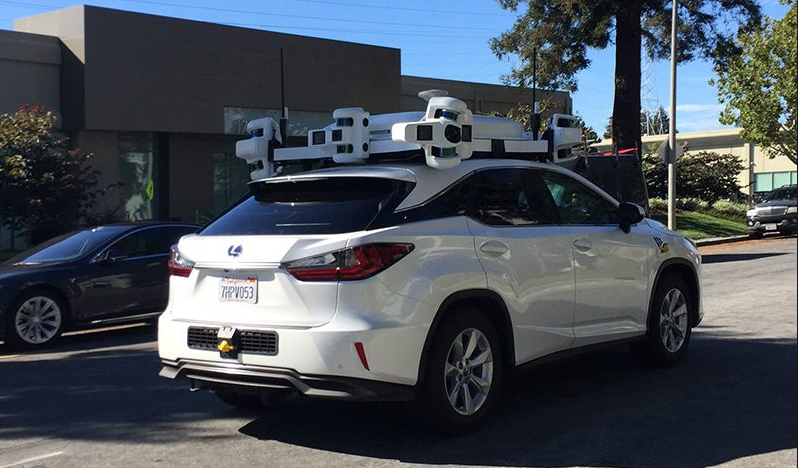
Apple is testing its self-driving vehicles in a number of Lexus SUVs out on the roads of Cupertino, and on August 24, one of those vehicles was involved in an accident.
Apple is required to disclose autonomous vehicle collisions to the California DMV, and the information on the accident was published on the DMV’s website.
According to the accident details, the vehicle in question was in autonomous mode at the time and sustained moderate damage in the crash, but it does not appear that Apple was at fault for the collision. From the accident report:
On August 24th at 2:58 p.m., an Apple vehicle in autonomous mode was rear-ended while preparing to merge onto Lawrence Expressway South from Kifer Road. The Apple test vehicle was traveling less than 1 mph waiting for a safe gap to complete the merge when a 2016 Nissan Leaf contacted the Apple test vehicle at approximately 15 mph. Both vehicles sustained damage and no injuries were reported by either party.
Apple has been testing its self-driving software in Lexus RX450h SUVs in Cupertino, California and surrounding areas since early 2017, but this is the first time an Apple vehicle has been involved in a crash.
Apple’s test vehicles are outfitted with a host of sensors and cameras, and while they are autonomous, each one has a pair of drivers inside. At the current time, Apple is testing its software in more than 60 vehicles.
It’s not yet clear what Apple plans to do with its self-driving software, but it could be added to existing cars and there are still rumors suggesting Apple is working on its own Apple-branded vehicle that could come out by 2025.
Apple is also working on a self-driving shuttle service called “PAIL,” an acronym for “Palo Alto to Infinite Loop.” The shuttle program will transport employees between Apple’s offices in Silicon Valley.
Source: macrumors










