
NEWS

Apple Focuses on Ease of Use in "Just Text Them the Money" Apple Pay ad

08/08/2018

2642

Apple on Tuesday uploaded a new Apple Pay-centric ad to its official YouTube channel, showing a conversation between two people squabbling over who gets to pay for dinner.
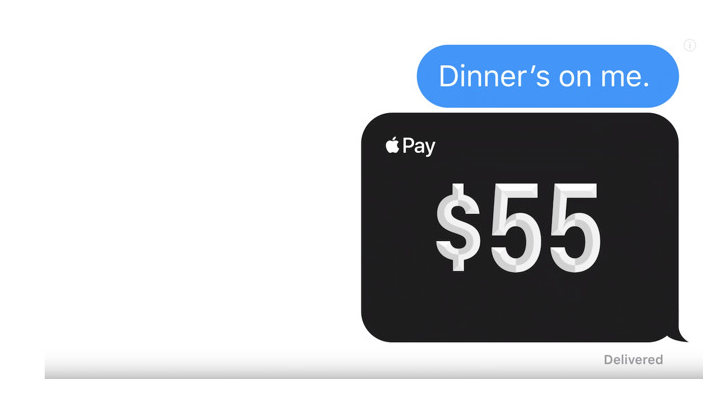

Apple Focuses on Ease of Use in

The ad starts with one person saying dinner is on them, and sending over $55 through Apple Pay Cash to their friend. The second person replies back that no, they've got it and shoots the $55 right back over. The pair then proceed to continuously send money back and forth as the ad speeds up and fades to a black screen that reads "Just text them the money." The "Apple Pay in Messages" tagline appears.


As with previous commercials in the series, today's spot is predominantly silent, the only noise being the sound of iMessages being sent.


Apple Pay has been gaining steam recently, performing well during Apple's most recent quarterly financial results as part of its "Services" category and winning top marks in Consumer Reports P2P mobile payment rankings. 


Later this year, Apple Pay will be expanding to Germany, as well as CVS and 7-11 in the U.S.


Source: appleinsider

Windows
Mac OS
iOS
Linux
3uTools
Win 64-bit For this device
V9.0 2025-11-11
Download
Win 32-bit For this device
V9.0 2025-11-11
Download
3uTools
Intel Chip How to Identify Chip Type
V9.0 2025-12-02
Download
Apple Silicon
V9.0 2025-12-02
Download
How to Identify Chip Type
1.  Click the Apple icon in the top-left corner of the screen and select About This Mac.
2.  Check the Processor or Chip field to determine if it is "Intel" or "Apple".
Please use the 3uTools PC client to install the iOS client:
1、 Install either the Windows or Mac version of 3uTools on your computer
2、 Open the PC client and connect your device to the computer via USB cable
3、 After the connection is successful, wait for the computer to automatically install the mobile app for the device, or locate “Install Mobile App” on the computer and manually click to install.
3uTools
deb file
V3.01 2025-11-20
Download
rpm file
V3.01 2025-11-20
Download
Windows
Windows
iOS
iOS
Android
Android
TV
TV
3uAirPlayer
Win 64-bit For this device
V6.0.2 2025-11-19
Download
Win 32-bit For this device
V6.0.2 2025-11-19
Download
iOS Device Mirroring (No App Required)
1、 Install 3uAirPlayer on the Windows PC
2、 Open Control Center and select Screen Mirroring
3、 From the list, choose your PC to start mirroring
4、 Or connect your iOS device to the PC via USB to begin mirroring
Scan to get "3uAirPlayer" App
3uAirPlayer TV V1.0.18
2025-11-28
TV System Requirements: Android 7.0 or later
Download the TV installation package, copy it to a USB drive, insert it into your TV or set-top box, then select the file from the home screen to install.




