 NEWS
NEWS
Apple Sold Fewest Macs in Any Quarter Since 2010
 08/02/2018
 3018
3018
Apple on Tuesday reported that it sold 3.72 million Macs in its third quarter, which spanned April 1 through June 30, the fewest in any single quarter since it sold 3.47 million in the third quarter of 2010.
It's also the first time Apple has sold fewer than four million Macs in a quarter since the third quarter of 2013, a span of five years.
Apple reported sales of 4.29 million Macs in the same quarter a year ago, so this is a pretty significant 13 percent decline on a year-over-year basis. Mac revenue also dropped five percent over the year-ago quarter.
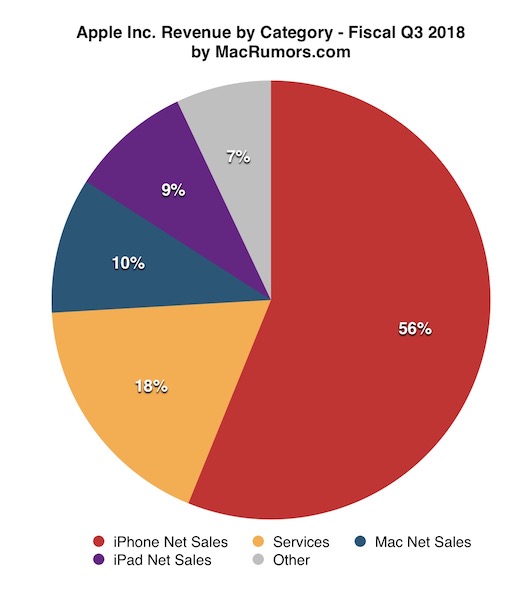
There are a number of possible explanations for the decline, including consumers increasingly shifting towards the iPhone and iPad. Together, those devices accounted for 65 percent of Apple's revenue last quarter, compared to just 10 percent for the Mac. Apple even markets the iPad as a computer replacement.
The bigger reason, however, may have been that nearly the entire Mac lineup was outdated last quarter. Beyond the iMac Pro, released four months before the quarter began, no other Mac had been updated since 2017 or earlier.
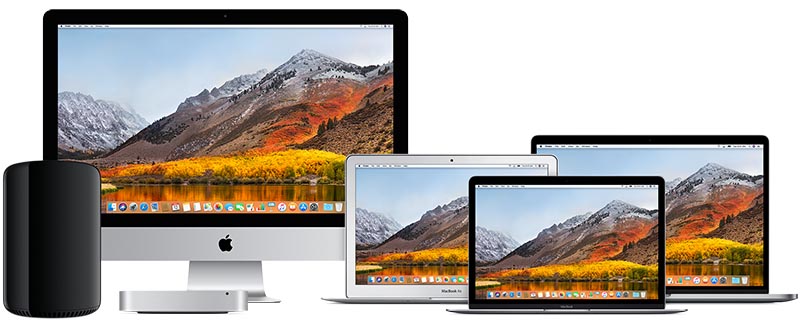
Apple hasn't updated its 12-inch MacBook and iMac lines since June 2017, while the MacBook Air has gone unchanged since March 2015, except for a minor increase in clock speed on the base model last year. Worse, the Mac mini hasn't been refreshed since October 2014, and the Mac Pro has gone unchanged since December 2013 while Apple works on a new modular version for 2019.
While the MacBook Pro was recently updated, the new models didn't launch until 12 days after the third quarter ended. Last year, new MacBook Pro models launched at WWDC in early June, well within the third quarter.
Apple's financial chief Luca Maestri highlighted this "difficult launch comparison" in the company's earnings call on Tuesday:
"Our year-over-year sales performance was impacted by the different timing of the MacBook Pro launch, which did not occur until early Q4 this year as opposed to June last year."
The month-later MacBook Pro refresh isn't enough to justify Apple's fewest Mac sales in any quarter since 2010, however, as the notebook has been updated at various times over the years. 2016 models were released in October of that year, for example, while 2013 models launched in February of that year.
Mac sales were the lowest in a quarter since 2010 - hard to blame the MacBook Pro coming out in July versus June. https://t.co/E6QDBJ9VYd
— Mark Gurman (@markgurman) August 1, 2018
Apple said it still recorded double-digit year-over-year growth in its active installed base of Macs last quarter, reaching a new all-time high, with nearly 60 percent of purchases coming from customers who are new to the Mac.
Fortunately, updates to the rest of the Mac lineup should be on the horizon. Apple analyst Ming-Chi Kuo expects the 12-inch MacBook, Mac mini, and iMac to be refreshed later this year, while a new entry-level notebook could replace the MacBook Air. And, as mentioned, Apple says a new Mac Pro is coming in 2019.
Source: macrumors









