NEWS

These Custom Gold AirPods Actually Cost $10,000

07/31/2018

2671

These Custom Gold AirPods Actually Cost $10,000


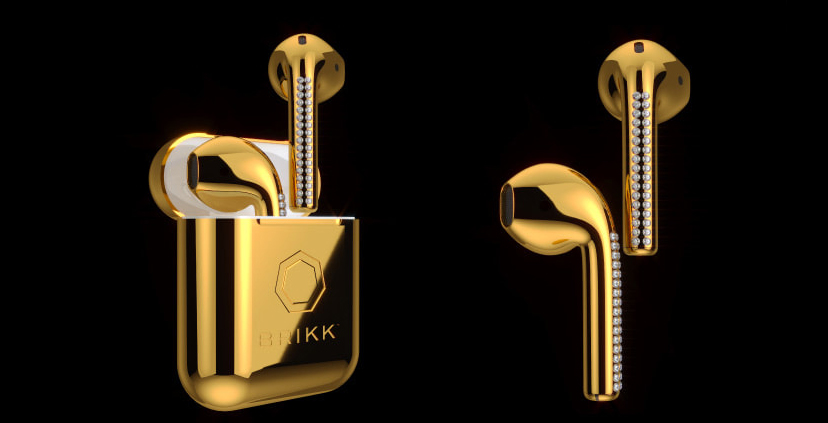
Apple’s AirPods might not have the best sound quality out there, but the wireless Bluetooth earbuds’ convenience factor is difficult to beat. With this in mind, have you ever considered buying $10,000 USD AirPods that are coated in two layers of 24k gold? No? Okay, well you probably aren’t alone. Brikk’s AirPods and charging cases feature two layers of either 24k gold, 19k rose gold, or finally, because this is a necessity when it comes to crazily priced earbuds, 950 platinum. Each earbud is also polished by hand, plated and assembled at Brikk’s lab in LA.

Along with these flashy AirPods, Brikk’s also sells luxury iPhone charging docks that come in three colours: ‘Yellow Gold,’ ‘Rose Gold,’ and ‘Platinum.’ And of cousre, the dock also includes a built-in audio jack and lightning port.


Source: mashable

Windows
Mac OS
iOS
Linux
3uTools
Win 64-bit For this device
V9.0 2025-11-11
Download
Win 32-bit For this device
V9.0 2025-11-11
Download
3uTools
Intel Chip How to Identify Chip Type
V9.0 2025-12-02
Download
Apple Chip
V9.0 2025-12-02
Download
How to Identify Chip Type
1.  Click the Apple icon in the top-left corner of the screen and select About This Mac.
2.  Check the Processor or Chip field to determine if it is "Intel" or "Apple".
Please use the 3uTools PC client to install the iOS client:
1、 Install either the Windows or Mac version of 3uTools on your computer
2、 Open the PC client and connect your device to the computer via USB cable
3、 After the connection is successful, wait for the computer to automatically install the mobile app for the device, or locate “Install Mobile App” on the computer and manually click to install.
3uTools
deb file
V3.01 2025-11-20
Download
rpm file
V3.01 2025-11-20
Download
Windows
Windows
iOS
iOS
Android
Android
TV
TV
3uAirPlayer
Win 64-bit For this device
V6.0.2 2025-11-19
Download
Win 32-bit For this device
V6.0.2 2025-11-19
Download
iOS Device Mirroring (No App Required)
1、 Install 3uAirPlayer on the Windows PC
2、 Open Control Center and select Screen Mirroring
3、 From the list, choose your PC to start mirroring
4、 Or connect your iOS device to the PC via USB to begin mirroring
Scan to get "3uAirPlayer" App
3uAirPlayer TV V1.0.18
2025-11-28
TV System Requirements: Android 7.0 or later
Download the TV installation package, copy it to a USB drive, insert it into your TV or set-top box, then select the file from the home screen to install.