
NEWS

ColorWare Releases Custom-Painted AirPods With Classic Macintosh Design

07/09/2018

2744

ColorWare this week released custom-painted AirPods with a classic Macintosh design, including a beige finish with faux vents and a six-color rainbow pairing button reminiscent of Apple's logo between 1977 and 1998. 
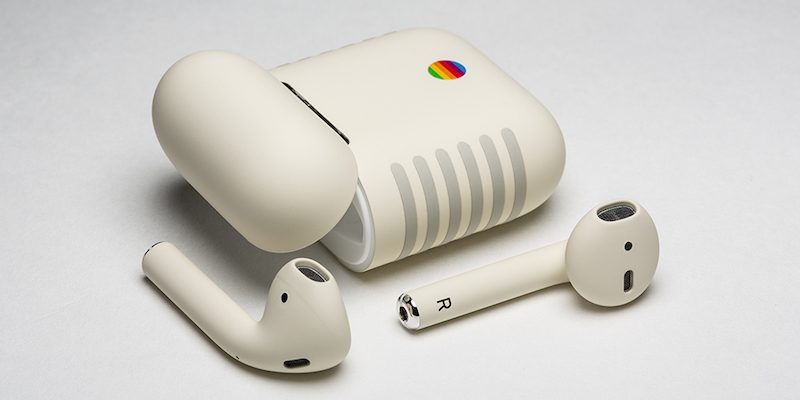

ColorWare Releases Custom-Painted AirPods With Classic Macintosh Design


The limited edition AirPods Retro, as they are called, are inspired by the Apple IIe, which actually predates the original Macintosh by a year, but the computers shared a similar design with an iconic Pantone 453 finish. 


ColorWare purchases the AirPods directly from Apple, applies the custom paint job to both the AirPods and their charging case, and then repackages them in Apple's original box with a Lightning to USB cable and documentation. 


The company doesn't currently offer after-the-fact customization of used AirPods, so if you already own a pair, you're out of luck. 


While the AirPods Retro have a unique design, they come at a steep cost of $399, more than double Apple's standard $159 price. Also be prepared to wait a bit, as shipping is estimated to take 3-4 weeks depending on the destination. 


Keep in mind that Apple is expected to release second-generation AirPods with "Hey Siri" support at its usual September event, alongside new iPhones and its AirPower charging mat, so it may be best to hold off on these. 


ColorWare also sells AirPods in limited edition Space Gray for $349 and dozens of other colors for $299. Prices are based on U.S. dollars.


Source: macrumors

Windows
Mac OS
iOS
Linux
3uTools
Win 64-bit For this device
V9.0 2025-11-11
Download
Win 32-bit For this device
V9.0 2025-11-11
Download
3uTools
Intel Chip How to Identify Chip Type
V9.0 2025-12-02
Download
Apple Silicon
V9.0 2025-12-02
Download
How to Identify Chip Type
1.  Click the Apple icon in the top-left corner of the screen and select About This Mac.
2.  Check the Processor or Chip field to determine if it is "Intel" or "Apple".
Please use the 3uTools PC client to install the iOS client:
1、 Install either the Windows or Mac version of 3uTools on your computer
2、 Open the PC client and connect your device to the computer via USB cable
3、 After the connection is successful, wait for the computer to automatically install the mobile app for the device, or locate “Install Mobile App” on the computer and manually click to install.
3uTools
deb file
V3.01 2025-11-20
Download
rpm file
V3.01 2025-11-20
Download
Windows
Windows
iOS
iOS
Android
Android
TV
TV
3uAirPlayer
Win 64-bit For this device
V6.0.2 2025-11-19
Download
Win 32-bit For this device
V6.0.2 2025-11-19
Download
iOS Device Mirroring (No App Required)
1、 Install 3uAirPlayer on the Windows PC
2、 Open Control Center and select Screen Mirroring
3、 From the list, choose your PC to start mirroring
4、 Or connect your iOS device to the PC via USB to begin mirroring
Scan to get "3uAirPlayer" App
3uAirPlayer TV V1.0.18
2025-11-28
TV System Requirements: Android 7.0 or later
Download the TV installation package, copy it to a USB drive, insert it into your TV or set-top box, then select the file from the home screen to install.




