 NEWS
NEWS
iPhone 8 Tops Latest Best-selling Smartphone List
 07/06/2018
 2982
2982
According to new data from Counterpoint Research, Apple locked in the best-selling smartphone title during May of 2018. At the top spot was the iPhone 8, while the Galaxy S9 Plus came in a very close second…
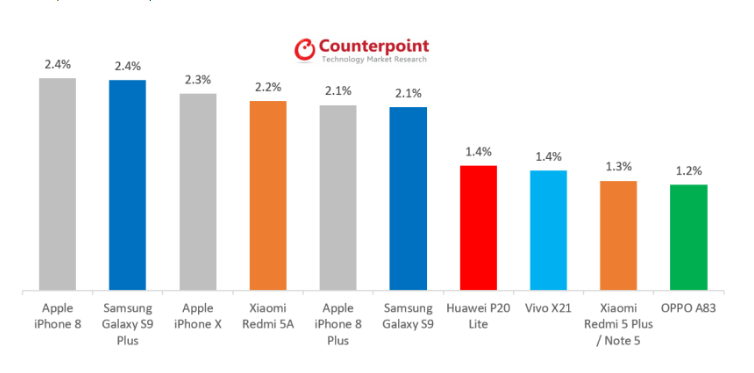
During April of 2018, Apple was beat out by Samsung, with the Galaxy S9 Plus coming atop the list. This time around, however, Apple’s iPhone 8 barely edged out the Galaxy S9 Plus. Both locked in 2.4 percent of the global smartphone market during the month, with the iPhone 8 ever so slightly coming in first.
As for the iPhone X, it accounted for 2.3 percent of the global smartphone sale marketshare – making it the third best-selling smartphone during May of 2018. In fourth was the Xiaomi Redmi 5A, while the iPhone 8 Plus came in fifth.
Counterpoint Research attributes the success of the iPhone 8 to new ad push from Apple, including its ‘How to shoot on iPhone’ campaign focused on the device’s camera technology:
According to the latest research from Counterpoint’s Market Pulse, Apple regained the top spot in the global best-selling smartphone list with the iPhone 8. Strong promotions (“How to shoot on iPhone”) running up to the football (soccer) World Cup helped the tech giant to trigger buyer interest in Europe and other markets. iPhone 8 sales were steady in the US postpaid channels.
What makes the iPhone 8’s success all the more notable is the fact that we’re looking down the barrel of a trio of new iPhones coming in just over 2 months. The constant rumors and speculation don’t seem to be having cannibalization effects on the last-generation devices, though.
Source: 9to5mac









