 NEWS
NEWS
Raise to Siri is Now Working with WatchOS 5 Beta
 07/05/2018
 2619
2619
One of the new watchOS 5 features demonstrated by Apple's Vice President of Technology Kevin Lynch at its Worldwide Developer Conference in June was "raise to Siri," a new Machine Learning shortcut that will invoke a Siri listening session without pushing a button or speaking the "Hey Siri" trigger phrase. It's now working in the latest beta versions, including beta 3 released today.
The change was noted on Reddit by TongueBandit69, who noted, "seems it was a server side change but you can now talk to Siri on watchOS 5 without saying the Hey Siri command first. It is so awesome! Was not working previously."
The same user also advised, "Make sure the setting is turned on on your watch under General/Siri. Also try a reboot. And obviously make sure you're on watchOS 5," and "before anyone asks, your Watch needs to be pretty close to your face to actually register that you're talking to Siri."
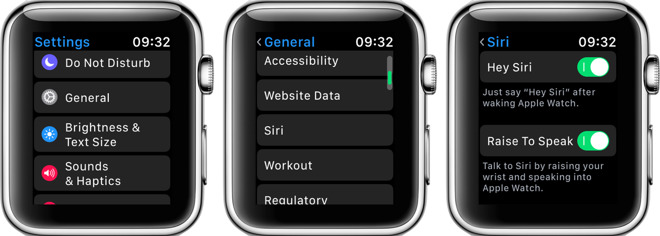
It addition to being more convenient, the new "raise to Siri" feature also allows users to target a Siri command (such as starting an inaudible tap timer without also triggering an iPhone, Mac or HomePod also listening for "Hey Siri."
The new feature also allows users to more easily invoke Siri on Apple Watch when riding a bike, or in other situation where a rapid, hands-free response is desired.
Apple's watchOS 5 was revealed at WWDC18 alongside iOS 12, macOS Mojave, and tvOS 12. watchOS 5 will support all models of Apple Watch except the original "Series 0" model, which will remain on watchOS 4.
The new Raise to Siri feature is just one of the scores of new embellishments in watchOS 5, including the FaceTime Audio-based Walkie Talkie that was activated in beta 2.
Other new features include Apple's smarter new Siri watch face with support for Siri Shortcuts; a new Podcasts app; new Activity Competitions with coaching and trophies; automatic Workout Detection; new Workouts including Hiking and Yoga; Pace Alerts, Rolling Miles and Cadence for runners; new support for WebKit enabling simple views of web content; scheduled Do Not Disturb; and enhanced grouped and interactive Notifications.
Source: appleinsider










