
NEWS

Latest iOS 12 Beta Lets Users Generate iCloud Links for Sharing Pictures

07/05/2018

3104

In the latest beta of the upcoming iOS 12 update, Apple has included a feature that lets users generate iCloud links for sharing pictures via the stock Photos app. 
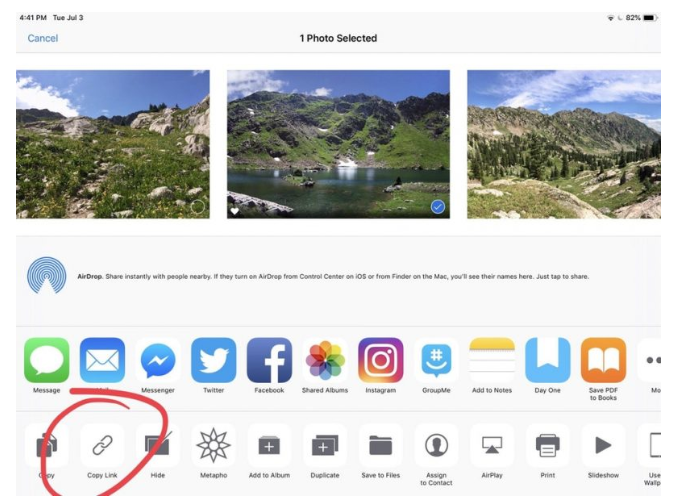

Latest iOS 12 Beta Lets Users Generate iCloud Links for Sharing Pictures

The iCloud.com URL link option, first noticed by Reddit user Hunkir


The new sharing option appears in the bottom row of the iOS Share Sheet, and allows users with iCloud Photos enabled to copy an iCloud.com URL link to one or several selected images that lasts for 30 days. 


Clicking a link in an email takes the recipient to a web page containing the image in question, as well as an option to download it. Sharing a link in the Messages app also shows a preview of the image right in the chat thread. The link also includes the author's name, the photo's title, and associated EXIF data, excluding location information. 


The addition should come in handy for times when you quickly want to share an image from your iOS device, minus the hassle of uploading it to a third-party service. It's also more than likely that the iCloud link sharing option will feature in macOS Mojave. 


Source: macrumors

Windows
Mac OS
iOS
Linux
3uTools
Win 64-bit For this device
V9.0 2025-11-11
Download
Win 32-bit For this device
V9.0 2025-11-11
Download
3uTools
Intel Chip How to Identify Chip Type
V9.0 2025-12-02
Download
Apple Chip
V9.0 2025-12-02
Download
How to Identify Chip Type
1.  Click the Apple icon in the top-left corner of the screen and select About This Mac.
2.  Check the Processor or Chip field to determine if it is "Intel" or "Apple".
Please use the 3uTools PC client to install the iOS client:
1、 Install either the Windows or Mac version of 3uTools on your computer
2、 Open the PC client and connect your device to the computer via USB cable
3、 After the connection is successful, wait for the computer to automatically install the mobile app for the device, or locate “Install Mobile App” on the computer and manually click to install.
3uTools
deb file
V3.01 2025-11-20
Download
rpm file
V3.01 2025-11-20
Download
Windows
Windows
iOS
iOS
Android
Android
TV
TV
3uAirPlayer
Win 64-bit For this device
V6.0.2 2025-11-19
Download
Win 32-bit For this device
V6.0.2 2025-11-19
Download
iOS Device Mirroring (No App Required)
1、 Install 3uAirPlayer on the Windows PC
2、 Open Control Center and select Screen Mirroring
3、 From the list, choose your PC to start mirroring
4、 Or connect your iOS device to the PC via USB to begin mirroring
Scan to get "3uAirPlayer" App
3uAirPlayer TV V1.0.18
2025-11-28
TV System Requirements: Android 7.0 or later
Download the TV installation package, copy it to a USB drive, insert it into your TV or set-top box, then select the file from the home screen to install.




