 NEWS
NEWS
Geekbench: Alleged 2018 iPhone Gains Around 10% Speed and 4GB RAM
 07/03/2018
 2745
2745
Third-party benchmarking tool Geekbench is occasionally the first to quantify performance improvements for an unreleased Apple product, and if a new benchmark first spotted by Consomac is accurate, at least one 2018 iPhone will see only modest speed bumps over the iPhone X. Listed under the Apple internal device code “iPhone 11,2” with a D321AP motherboard, the benchmarked model could be either the iPhone 9 or iPhone 11 — or an elaborate fake.
Geekbench’s result browser shows the phone as having been tested last week and suggests that its ARM processor has similar characteristics to the A11 Bionic chip inside 2017 iPhones: six cores and a base frequency of 2.49GHz, a tiny change over the iPhone X’s 2.39GHz. But RAM has increased from 2815MB (3GB) to 3748MB (4GB), and the level 1 instruction and data caches have jumped from 32KB to 128KB.
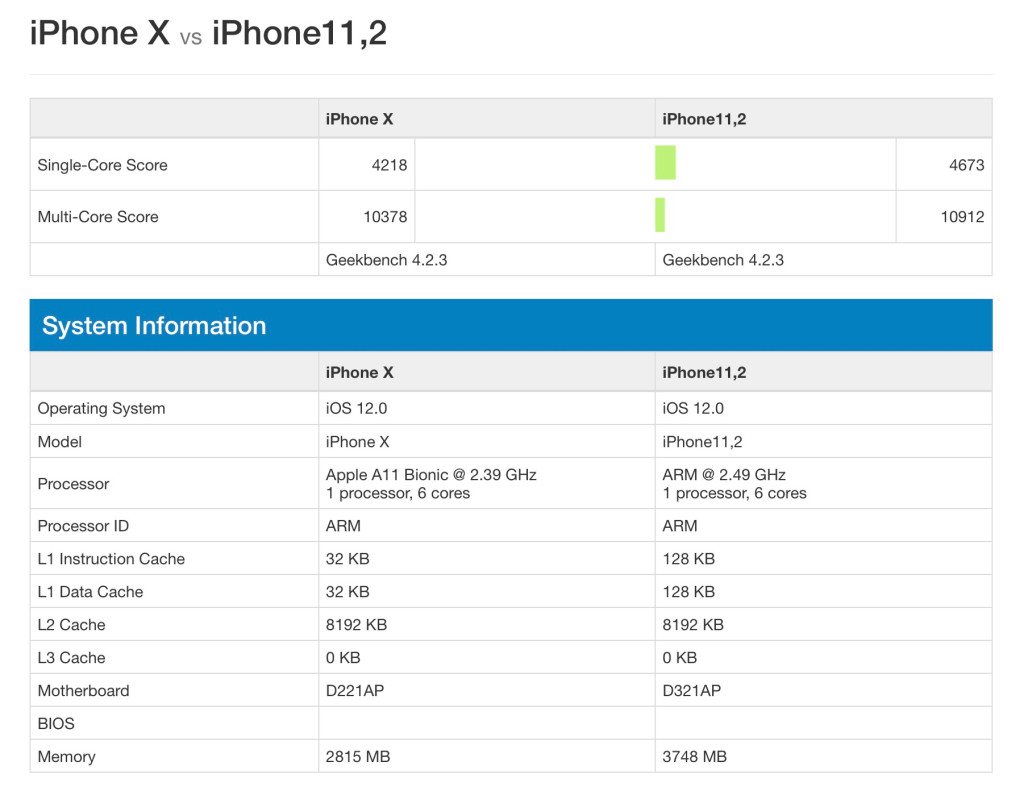
Thanks in part to RAM tweaks, the alleged new iPhone’s single-core score of 4673 eclipses the iPhone X by around 10 percent. The multi-core score of 10912 is similarly roughly 5 percent better, but with marked improvements in memory and crypto test scores, as well as big jumps in face detection and speech recognition tests.
A few caveats suggest the results should be taken with at least a grain of salt. Fake results are sometimes published in the Geekbench browser, and even legitimate results can be somewhat misleading for processors — including Apple’s — that switch between different types of cores and dynamically adjust performance to conserve energy. An individual benchmark thus reveals a snapshot of performance inside the device’s range, but not the entirety of that range, which could be better.
It’s also unclear which 2018 iPhone the “iPhone 11,2” model represents. In 2017, Apple released three new iPhones with six total device codes — based on varied internal components — as follows:
iPhone 10,1 – iPhone 8
iPhone 10,2 – iPhone 8 Plus
iPhone 10,3 – iPhone X
iPhone 10,4 – iPhone 8
iPhone 10,5 – iPhone 8 Plus
iPhone 10,6 – iPhone X
For 2018, Apple is expected to release three new models, including a single-sized iPhone 9 and small/large sequels to the iPhone X, possibly known as the iPhone 11 and iPhone 11 Plus. The iPhone 11,2 could be any of the phones, or none of them, but the bump in RAM might suggest a higher-end model; this difference was rumored in a KGI analyst’s report earlier this year. If Apple follows its 2017 example, however, the chip differences between its latest phones will be small, or possibly nonexistent.
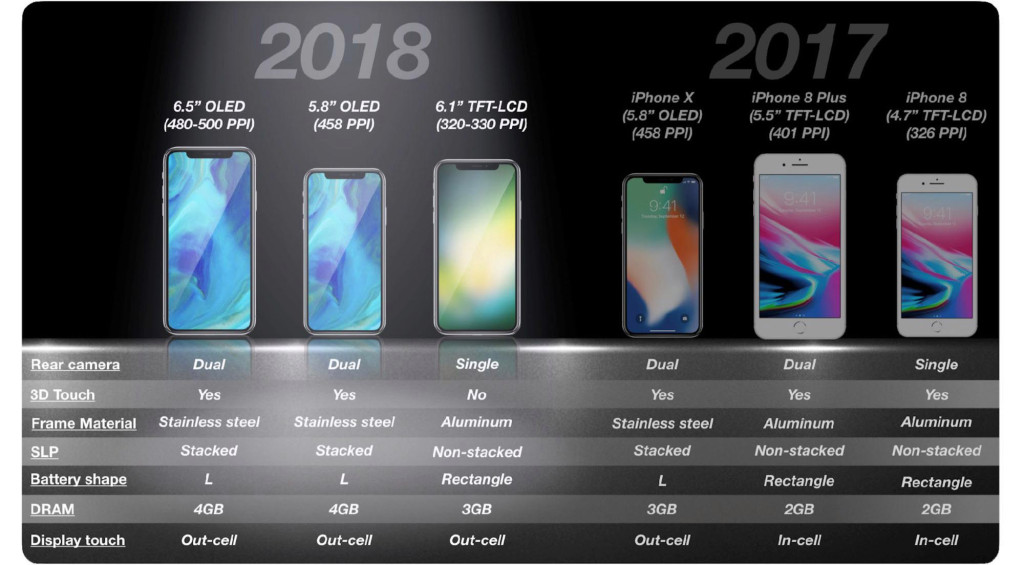
Apple uses each new generation of A-series processors as an opportunity to decide whether to focus on improving performance, battery life, or a combination of the two. A small gain in performance may indicate a larger gain in battery life, though nothing is guaranteed — batteries and other components can also change, offsetting processor improvements.
Source: venture beat









