
NEWS

Apple to Host Panic! At the Disco at WWDC18 Bash

06/07/2018

2936

At Apple's 2018 Worldwide Developer Conference Bash on Thursday evening, the company will host a "special DJ" and a "victorious" performance by multi-platinum artists Panic! At The Disco.
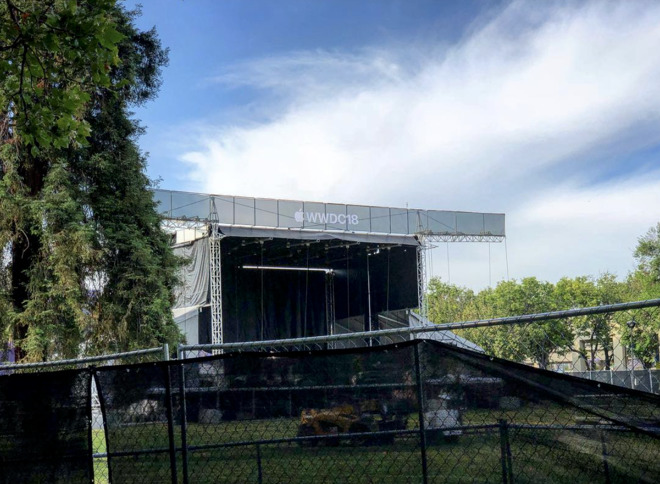

Apple to Host Panic! At the Disco at WWDC18 Bash


Apple is currently building out the Bash grounds and stage at Discovery Meadow in San Jose (above), just around the corner from the Convention Center where WWDC events are being held.


Apple's annual WWDC Bash wraps up the week-long developer convention on Thursday, the last evening for many attendees traveling from around the world to see Apple's latest platform tech and speak with engineers in the event's hands-on Labs.


Last year, Apple invited Fall Out Boy; Good Charlotte in 2016; Walk the Moon performed in 2015; in 2014 the company hosted Bastille, and the year prior to that, Vampire Weekend.


Source: appleinsider

Windows
Mac OS
iOS
Linux
3uTools
Win 64-bit For this device
V9.0 2025-11-11
Download
Win 32-bit For this device
V9.0 2025-11-11
Download
3uTools V3.18
2025-09-18
Please use the 3uTools PC client to install the iOS client:
1、 Install either the Windows or Mac version of 3uTools on your computer
2、 Open the PC client and connect your device to the computer via USB cable
3、 After the connection is successful, wait for the computer to automatically install the mobile app for the device, or locate “Install Mobile App” on the computer and manually click to install.
3uTools
deb file
V3.01 2025-11-20
Download
rpm file
V3.01 2025-11-20
Download
Windows
Windows
iOS
iOS
Android
Android
TV
TV
3uAirPlayer
Win 64-bit For this device
V6.0.2 2025-11-19
Download
Win 32-bit For this device
V6.0.2 2025-11-19
Download
iOS Device Mirroring (No App Required)
1、 Install 3uAirPlayer on the Windows PC
2、 Open Control Center and select Screen Mirroring
3、 From the list, choose your PC to start mirroring
4、 Or connect your iOS device to the PC via USB to begin mirroring
Scan to get "3uAirPlayer" App
3uAirPlayer TV V1.0.18
2025-11-28
TV System Requirements: Android 7.0 or later
Download the TV installation package, copy it to a USB drive, insert it into your TV or set-top box, then select the file from the home screen to install.




