
NEWS

This Map Shows How Much the iPhone 7 Costs Around The World

06/04/2018

2355

Two years ago, the newly-unveiled iPhone 7 represented the pinnacle of Apple's smartphone design.


Two years later, it's still a gorgeous and incredible smartphone — and thankfully, it's more affordable than ever. In fact, the iPhone 7 probably gives you the most bang for your buck among any of the iPhones you can buy right now.


In the US, the most basic iPhone 7 with 32 GB of storage starts at $549 before taxes and other fees. That's almost half the price of the iPhone X, and the iPhone 7 competes very well with that newer phone in terms of specs and features.
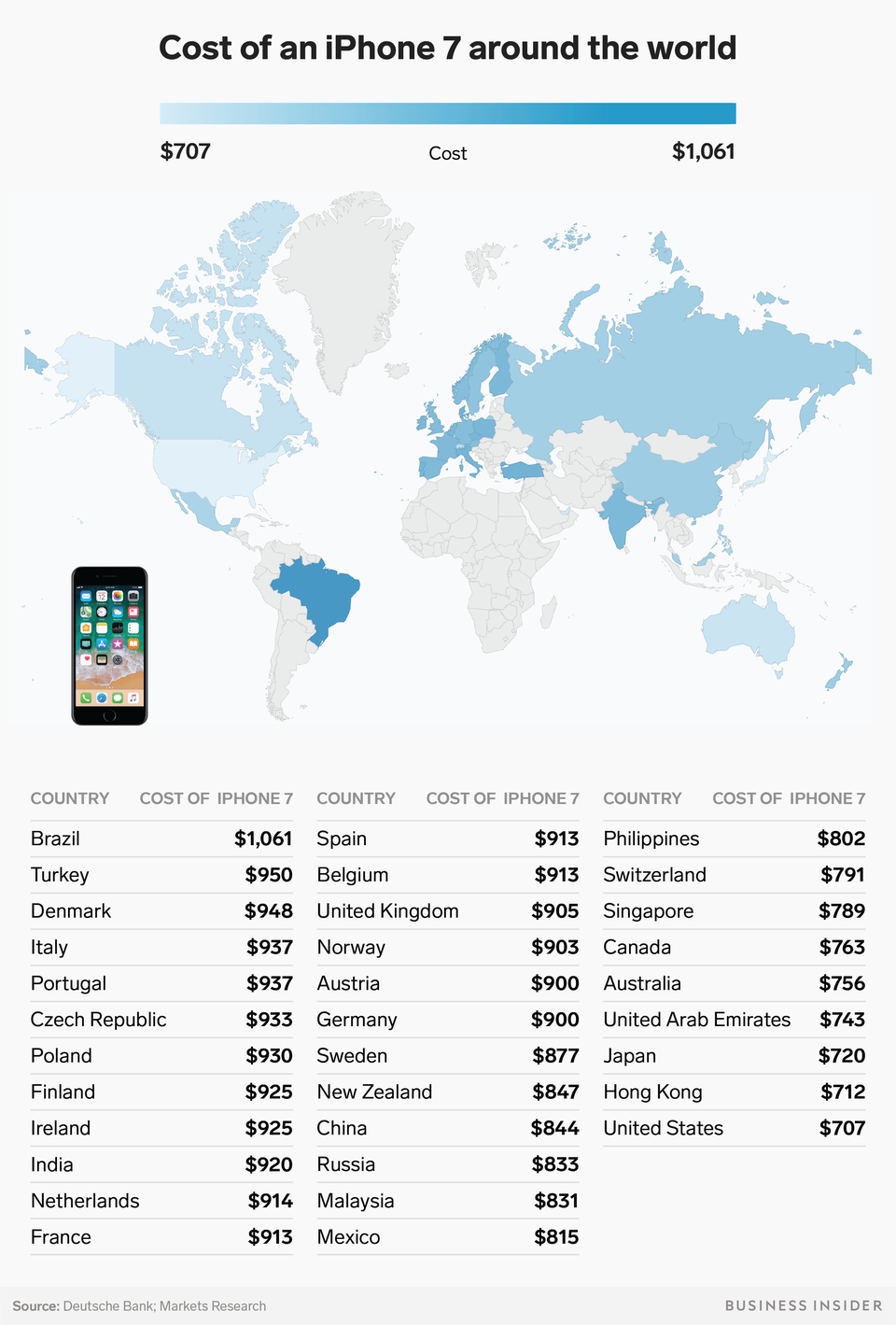

This Map Shows How Much the iPhone 7 Costs Around The World


Outside the US, the price of the iPhone 7 is a slightly different story.


Notably, you're paying about $50 to $60 more for the iPhone 7 if you live in Canada or Australia, about $100 more if you live in Mexico, and $200 more if you live in the United Kingdom or other European countries like Spain, France, Belgium, and the Netherlands. But the iPhone 7 is most expensive in Brazil, where it costs about $350 more than it does in the US. Brazil has long been the most expensive place in the world to buy an iPhone — mainly because the country applies a high flat import tax on most manufactured retail goods.


Windows
Mac OS
iOS
Linux
3uTools
Win 64-bit For this device
V9.0 2025-11-11
Download
Win 32-bit For this device
V9.0 2025-11-11
Download
3uTools
Intel Chip How to Identify Chip Type
V9.0 2025-12-02
Download
Apple Chip
V9.0 2025-12-02
Download
How to Identify Chip Type
1.  Click the Apple icon in the top-left corner of the screen and select About This Mac.
2.  Check the Processor or Chip field to determine if it is "Intel" or "Apple".
Please use the 3uTools PC client to install the iOS client:
1、 Install either the Windows or Mac version of 3uTools on your computer
2、 Open the PC client and connect your device to the computer via USB cable
3、 After the connection is successful, wait for the computer to automatically install the mobile app for the device, or locate “Install Mobile App” on the computer and manually click to install.
3uTools
deb file
V3.01 2025-11-20
Download
rpm file
V3.01 2025-11-20
Download
Windows
Windows
iOS
iOS
Android
Android
TV
TV
3uAirPlayer
Win 64-bit For this device
V6.0.2 2025-11-19
Download
Win 32-bit For this device
V6.0.2 2025-11-19
Download
iOS Device Mirroring (No App Required)
1、 Install 3uAirPlayer on the Windows PC
2、 Open Control Center and select Screen Mirroring
3、 From the list, choose your PC to start mirroring
4、 Or connect your iOS device to the PC via USB to begin mirroring
Scan to get "3uAirPlayer" App
3uAirPlayer TV V1.0.18
2025-11-28
TV System Requirements: Android 7.0 or later
Download the TV installation package, copy it to a USB drive, insert it into your TV or set-top box, then select the file from the home screen to install.



