 NEWS
NEWS
Apple Prepares McEnery Convention Center for WWDC 2018
 05/31/2018
 2694
2694
Preparations are underway for next week's Worldwide Developers Conference, as Apple on Wednesday began the process of installing banners, flags, signage and other decorations at the main venue that will host this year's event.
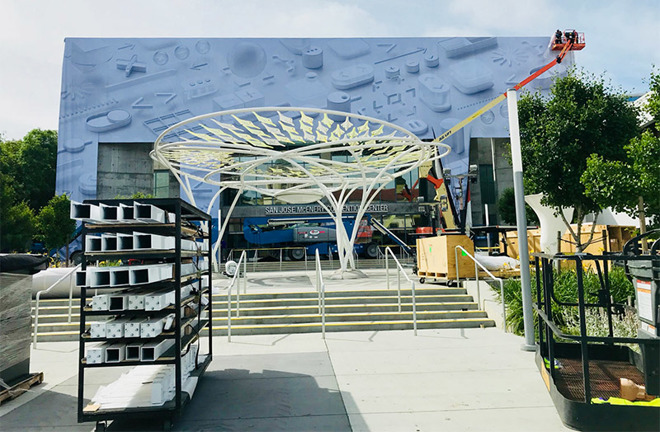
As it did last year, Apple is quickly transforming San Jose's McEnery Convention Center into a mecca for developers, and attendees in town for the gathering are posting pictures of the venue to social media outlets like Instagram and Twitter.
Like WWDC 2017, Apple is emblazoning McEnery's entire front facade with artwork reflecting WWDC 2018 media first seen a March announcement. The design, which features a series of three-dimensional graphical user interface assets floating above a white pegboard, has been used in subsequent email correspondence, a dedicated WWDC webpage and iOS companion app.
Along with building signage, workers are hanging posters inside the convention center and flags on nearby street light posts.
Akin to last year's conference, McEnery Convention Center will act as the hub of operations for developers visiting San Jose to take part in WWDC activities. There, attendees will be able to access technology sessions and labs run by Apple engineers, consult with key company personnel, attend special guest speaker presentations and more.
WWDC spills over into the surrounding area, with at least one session, a workout bootcamp led by Kayla Itsines, scheduled to take place in the City National Civic theater located across the street from McEnery.
Apple is primed to unveil a host of new software technologies at WWDC 2018, highlighted by a next-generation "iOS 12" operating system for its flagship iPhone devices. Updates to the company's core platforms — macOS, watchOS and tvOS — are also expected, as are announcements related to frameworks covering health, artificial intelligence, augmented reality and more.
While WWDC is not designed to serve as a launch platform for new hardware, Apple has in the past leveraged the event to introduce products. In 2017, for example, the company debuted the 10.5-inch iPad Pro, iMac Pro and HomePod alongside spec bumps to the MacBook and iMac lines. This year, rumors suggest Apple is planning to limit announcements to a refreshed MacBook lineup.
For a full rundown of what to expect, you could read our article.
Source: appleinsider










