
NEWS

Overhauled Google News App Arrives on the App Store for iPhone

05/16/2018

3148

The new Google News app has arrived for iOS devices. The revised app, which was announced at Google’s annual developer’s conference, I/O, earlier this month, takes advantage of artificial intelligence and machine learning to bring you stories.


In perhaps its most significant update since it first arrived in the App Store, the official Google News app offers content based on your designated news sources and perhaps, more importantly, your past reading history. In doing so, the universal app organizes your content in real-time.
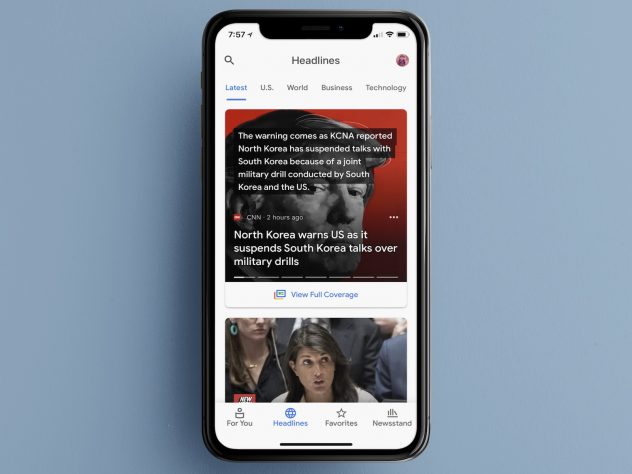

Overhauled Google News App Arrives on the App Store for iPhone


On Google New’s For You page, you’ll find a five-story briefing (with an icon showing your location’s current weather conditions) followed by news articles featuring content you’ve shown an interest in previously.


Under Headlines are stories organized by general topics such as Business, Technology, and Entertainment. Each story includes two icons after the summary of the article. When clicked, the first icon takes you to a Full Coverage page. Presented here are links to additional resources on the same topic as the main article. When tapped, the second icon offers sharing options, plus a link to hide future stories from the current content provider.


Source: idownloadblog

Windows
Mac OS
iOS
Linux
3uTools
Win 64-bit For this device
V9.0 2025-11-11
Download
Win 32-bit For this device
V9.0 2025-11-11
Download
3uTools
Intel Chip How to Identify Chip Type
V9.0 2025-12-02
Download
Apple Chip
V9.0 2025-12-02
Download
How to Identify Chip Type
1.  Click the Apple icon in the top-left corner of the screen and select About This Mac.
2.  Check the Processor or Chip field to determine if it is "Intel" or "Apple".
Please use the 3uTools PC client to install the iOS client:
1、 Install either the Windows or Mac version of 3uTools on your computer
2、 Open the PC client and connect your device to the computer via USB cable
3、 After the connection is successful, wait for the computer to automatically install the mobile app for the device, or locate “Install Mobile App” on the computer and manually click to install.
3uTools
deb file
V3.01 2025-11-20
Download
rpm file
V3.01 2025-11-20
Download
Windows
Windows
iOS
iOS
Android
Android
TV
TV
3uAirPlayer
Win 64-bit For this device
V6.0.2 2025-11-19
Download
Win 32-bit For this device
V6.0.2 2025-11-19
Download
iOS Device Mirroring (No App Required)
1、 Install 3uAirPlayer on the Windows PC
2、 Open Control Center and select Screen Mirroring
3、 From the list, choose your PC to start mirroring
4、 Or connect your iOS device to the PC via USB to begin mirroring
Scan to get "3uAirPlayer" App
3uAirPlayer TV V1.0.18
2025-11-28
TV System Requirements: Android 7.0 or later
Download the TV installation package, copy it to a USB drive, insert it into your TV or set-top box, then select the file from the home screen to install.





