
NEWS

Apple Watch Boosts Verizon Activations

04/25/2018

3027

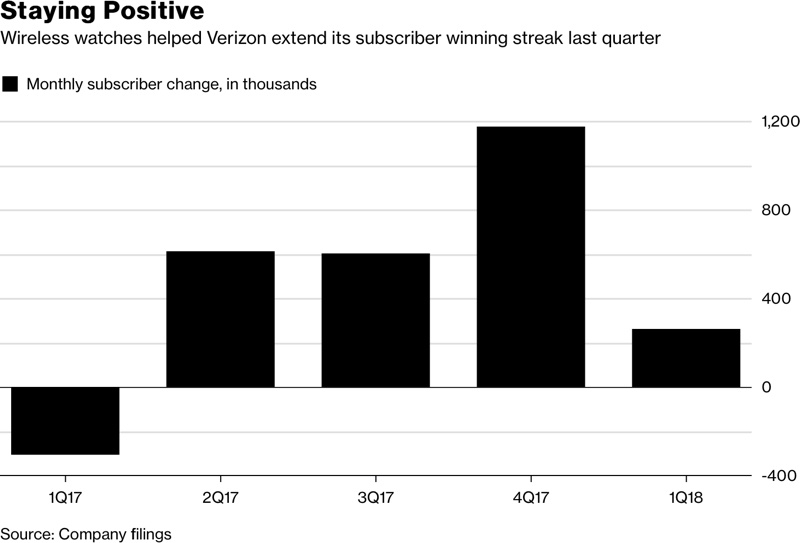
Verizon, the largest carrier in the United States by subscriber count, saw a monthly subscriber increase of 260,000 during the first quarter of 2018, reports Bloomberg, largely due to an increased number of smart watch activations. 


The company actually lost phone and tablet subscribers last quarter, but the dip in subscribers did not hurt its bottom line because of smart watches, wearables, and other connected devices like vehicles. 

Apple Watch Boosts Verizon Activations


Verizon says it added a total of 359,000 subscribers who are using smart watches and other devices during the quarter, making up for the loss of 24,000 phone customers and 75,000 tablet customers. 


There was no breakdown in the number of activations by specific device, but Verizon's jump in smart watch subscribers comes following the September release of the Apple Watch Series 3, the first Apple Watch with LTE connectivity. 


The Apple Watch Series 3 allows customers to use the Apple Watch sans iPhone for the first time, as it has its own cellular connection. Verizon and other carriers charge customers $10 per month to add a smart watch to an existing smartphone plan. 


Verizon shared the numbers during its first quarter 2018 earnings results, released this morning. Verizon stock has since surged as much as 3.6 percent.


Source: macrumors

Windows
Mac OS
iOS
Linux
3uTools
Win 64-bit For this device
V9.0 2025-11-11
Download
Win 32-bit For this device
V9.0 2025-11-11
Download
3uTools
Intel Chip How to Identify Chip Type
V9.0 2025-12-02
Download
Apple Chip
V9.0 2025-12-02
Download
How to Identify Chip Type
1.  Click the Apple icon in the top-left corner of the screen and select About This Mac.
2.  Check the Processor or Chip field to determine if it is "Intel" or "Apple".
Please use the 3uTools PC client to install the iOS client:
1、 Install either the Windows or Mac version of 3uTools on your computer
2、 Open the PC client and connect your device to the computer via USB cable
3、 After the connection is successful, wait for the computer to automatically install the mobile app for the device, or locate “Install Mobile App” on the computer and manually click to install.
3uTools
deb file
V3.01 2025-11-20
Download
rpm file
V3.01 2025-11-20
Download
Windows
Windows
iOS
iOS
Android
Android
TV
TV
3uAirPlayer
Win 64-bit For this device
V6.0.2 2025-11-19
Download
Win 32-bit For this device
V6.0.2 2025-11-19
Download
iOS Device Mirroring (No App Required)
1、 Install 3uAirPlayer on the Windows PC
2、 Open Control Center and select Screen Mirroring
3、 From the list, choose your PC to start mirroring
4、 Or connect your iOS device to the PC via USB to begin mirroring
Scan to get "3uAirPlayer" App
3uAirPlayer TV V1.0.18
2025-11-28
TV System Requirements: Android 7.0 or later
Download the TV installation package, copy it to a USB drive, insert it into your TV or set-top box, then select the file from the home screen to install.





