 NEWS
NEWS
User-space Security Research Platform Coming Soon for iOS 11.2.x
 04/24/2018
 2767
2767
After a relative period of calm, it seems that things are once again starting to progress as far as the jailbreak community is concerned.
A relatively unknown member of the community, Brandon Azad, has announced via Twitter that he is currently working on a research platform which will be applicable on iOS 11.2.6 and below.
Like many people involved in the iOS community, whether they be from a development or research discipline, Azad has used Twitter as his social network of choice to reveal that he is actively undertaking a project related to iOS 11.2.6 and below.
According to the developer, this project will result in the production of a “userspace security research platform” which will essentially allow device owners a compatible firmware to run signed binaries and specific tweaks:
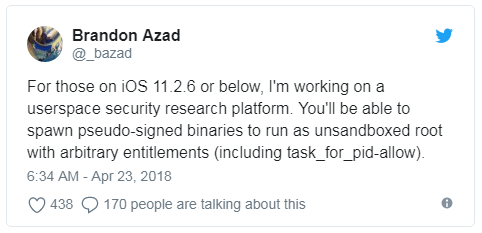
Without going into the in-depth technicalities of what’s on the tablet, it would seem that the developer is working to put together a platform which will allow individuals on iOS 11.2.6 and below to run specific apps and tweaks outside of a sandboxed environment. This is in no way akin to having a full jailbreak on the device and it certainly won’t give access to Cydia and the ability to install any tweaks or packages, but it will be an environment in which device owners are afforded with additional flexibility which doesn’t come when running a stock version of Apple’s iOS platform.
The tweet doesn’t specifically give any timescales for release or what form this release will actually take but it’s likely that it will be “officially” intended for use by developers or researchers and that it will have minimal benefit to the general consumers. It’s also unknown if this work could form the basis of something bigger and better in the future.
As is always the case whenever anything new is announced in the world of jailbreaking, we will keep you updated as things progress so that you know exactly what’s happening what you can expect.
Source: redmond pie









