
NEWS

Star Wars Holochess Comes to the iPhone with ARKit

04/20/2018

2731

Disney is letting people play Star Wars’ Dejarik holochess game for free on iOS in augmented reality through ARKit. The new game actually comes as an update to last year’s Star Wars: Jedi Challenges AR game, which originally included holochess but required the purchase of hardware accessories.
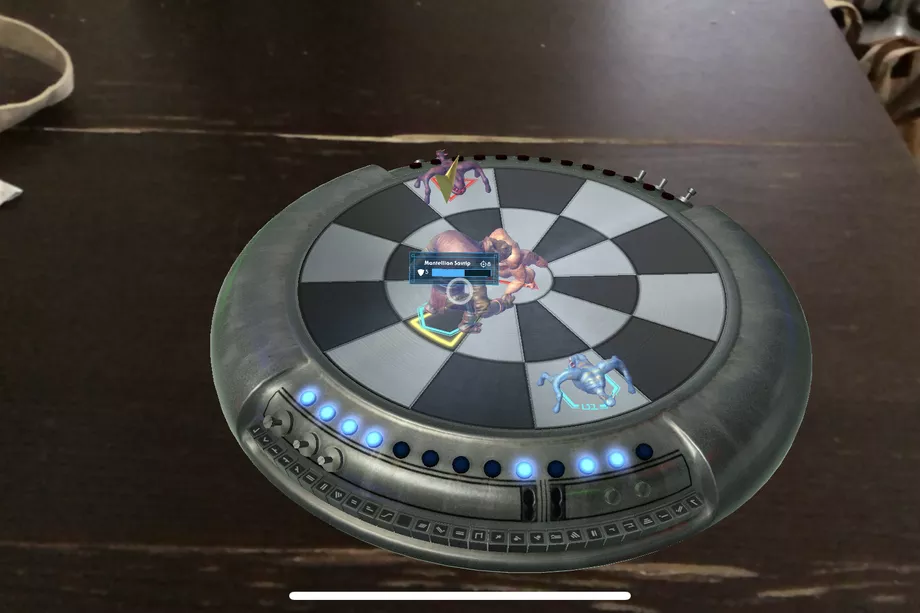

Star Wars Holochess Comes to the iPhone with ARKit


The ARKit holochess variant seems to be the same version from the original Jedi Challenges, just ported over so that users don’t need to buy the headset or lightsaber attachment — even instructions in the game tell you to “direct your gaze” to interact with the board. I took it for a spin for a few minutes, and it works okay, although the ported nature of the game is apparent. It has small, hard-to-read text and awkward controls that were clearly meant more for the original AR headset than the iPhone’s AR solution.


Still, it’s a fun diversion for a few minutes, especially for Star Wars fans who have been dying to play a round or two of the iconic board game. A word of advice, though: “Let the Wookie win.”


Star Wars Holochess Comes to the iPhone with ARKit


Source: theverge

Windows
Mac OS
iOS
Linux
3uTools
Win 64-bit For this device
V9.0 2025-11-11
Download
Win 32-bit For this device
V9.0 2025-11-11
Download
3uTools
Intel Chip How to Identify Chip Type
V9.0 2025-12-02
Download
Apple Silicon
V9.0 2025-12-02
Download
How to Identify Chip Type
1.  Click the Apple icon in the top-left corner of the screen and select About This Mac.
2.  Check the Processor or Chip field to determine if it is "Intel" or "Apple".
Please use the 3uTools PC client to install the iOS client:
1、 Install either the Windows or Mac version of 3uTools on your computer
2、 Open the PC client and connect your device to the computer via USB cable
3、 After the connection is successful, wait for the computer to automatically install the mobile app for the device, or locate “Install Mobile App” on the computer and manually click to install.
3uTools
deb file
V3.01 2025-11-20
Download
rpm file
V3.01 2025-11-20
Download
Windows
Windows
iOS
iOS
Android
Android
TV
TV
3uAirPlayer
Win 64-bit For this device
V6.0.2 2025-11-19
Download
Win 32-bit For this device
V6.0.2 2025-11-19
Download
iOS Device Mirroring (No App Required)
1、 Install 3uAirPlayer on the Windows PC
2、 Open Control Center and select Screen Mirroring
3、 From the list, choose your PC to start mirroring
4、 Or connect your iOS device to the PC via USB to begin mirroring
Scan to get "3uAirPlayer" App
3uAirPlayer TV V1.0.18
2025-11-28
TV System Requirements: Android 7.0 or later
Download the TV installation package, copy it to a USB drive, insert it into your TV or set-top box, then select the file from the home screen to install.





