
NEWS

Apple Debuts iPhone and iPad Cases in Seasonal Colors

03/28/2018

2434

On Tuesday, the same day it held its education-focused event in Chicago, Apple quietly unveiled new iPhone and iPad case accessories with seasonal colors for spring that match the previously announced Apple Watch bands.
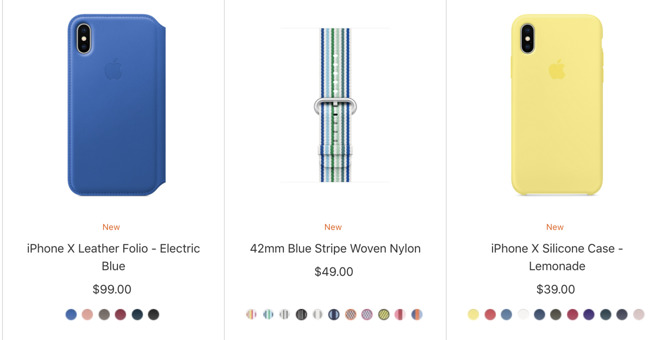


Apple Debuts iPhone and iPad Cases in Seasonal Colors


The new line includes refreshed colors for iPhone X cases, including the iPhone X Leather Folio in Electric Blue for $99, the iPhone X Silicone Case, now in Lemonade for $39 and the iPhone X Leather Case in Soft Pink for $49.


All of these iPhone cases are also available in other colors, with the "classic" assortment that launched with the iPhone 8 and iPhone X still available.


Other new cases include the Leather Sleeve for 10.50-inch iPad Pro, also in Electric Blue ($129), the iPhone 8 Plus/7 Plus Leather Case in Spring Yellow ($49) and the iPhone 8 Plus/7 Plus Silicone Case in Denim Blue ($39.) 


These follow a colorful collection of new Apple Watch bands that were unveiled last week and went on sale today, featuring new colors for the Sport Band, Nike Sport Loop and more. Apple also unveiled seasonal cases for the iPhone 7 around this time in 2017.


Source: appleinsider

Windows
Mac OS
iOS
Linux
3uTools
Win 64-bit For this device
V9.01 2025-12-27
Download
Win 32-bit For this device
V9.01 2025-12-27
Download
3uTools
Intel Chip How to Identify Chip Type
V9.0 2025-12-02
Download
Apple Silicon
V9.0 2025-12-02
Download
How to Identify Chip Type
1.  Click the Apple icon in the top-left corner of the screen and select About This Mac.
2.  Check the Processor or Chip field to determine if it is "Intel" or "Apple".
Please use the 3uTools PC client to install the iOS client:
1、 Install either the Windows or Mac version of 3uTools on your computer
2、 Open the PC client and connect your device to the computer via USB cable
3、 After the connection is successful, wait for the computer to automatically install the mobile app for the device, or locate “Install Mobile App” on the computer and manually click to install.
3uTools
deb file
V3.01 2025-11-20
Download
rpm file
V3.01 2025-11-20
Download
Windows
Windows
iOS
iOS
Android
Android
TV
TV
3uAirPlayer
Win 64-bit For this device
V6.0.2 2025-11-19
Download
Win 32-bit For this device
V6.0.2 2025-11-19
Download
iOS Device Mirroring (No App Required)
1、 Install 3uAirPlayer on the Windows PC
2、 Open Control Center and select Screen Mirroring
3、 From the list, choose your PC to start mirroring
4、 Or connect your iOS device to the PC via USB to begin mirroring
Scan to get "3uAirPlayer" App
3uAirPlayer TV V1.0.18
2025-11-28
TV System Requirements: Android 7.0 or later
Download the TV installation package, copy it to a USB drive, insert it into your TV or set-top box, then select the file from the home screen to install.




